Cloud Gaming Data Usage on Mobile and Managing Cellular Caps
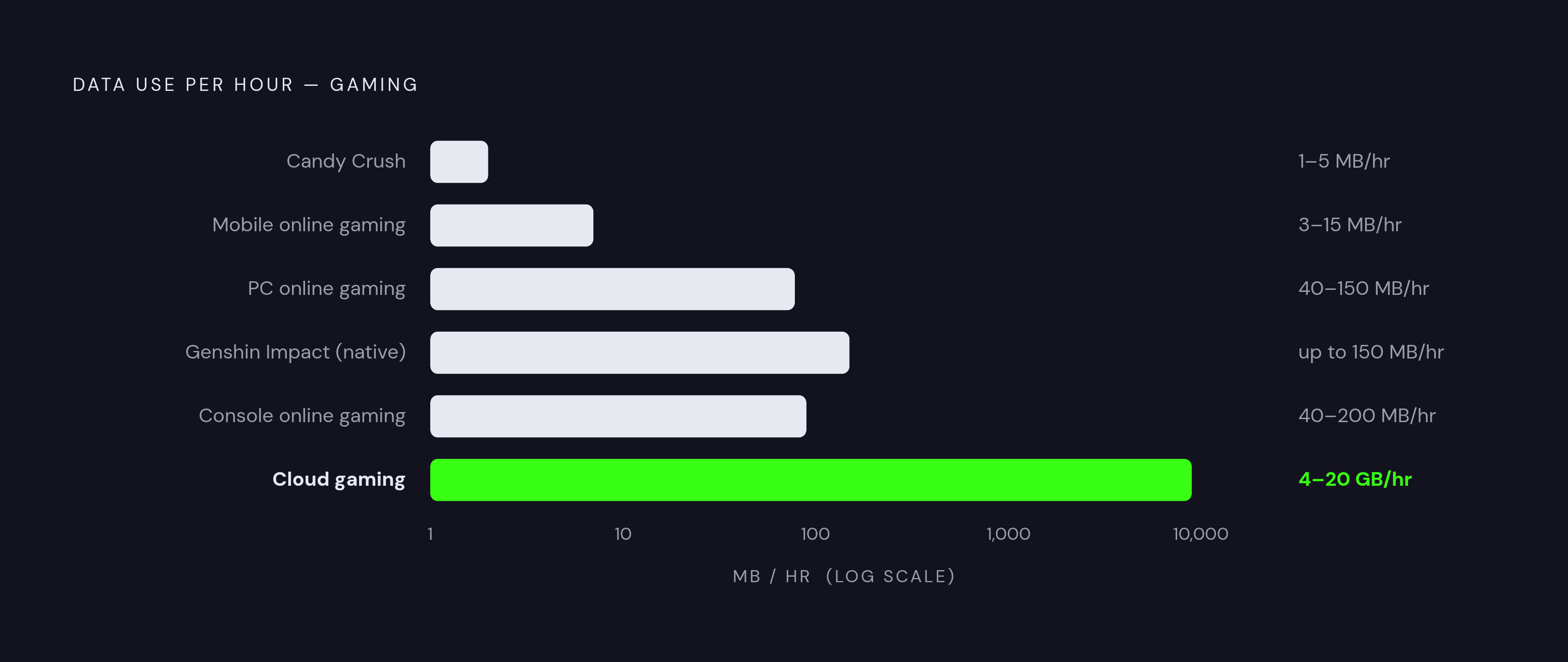
Cloud gaming devours 4GB to 20GB per hour depending on resolution, frame rate, and codec.
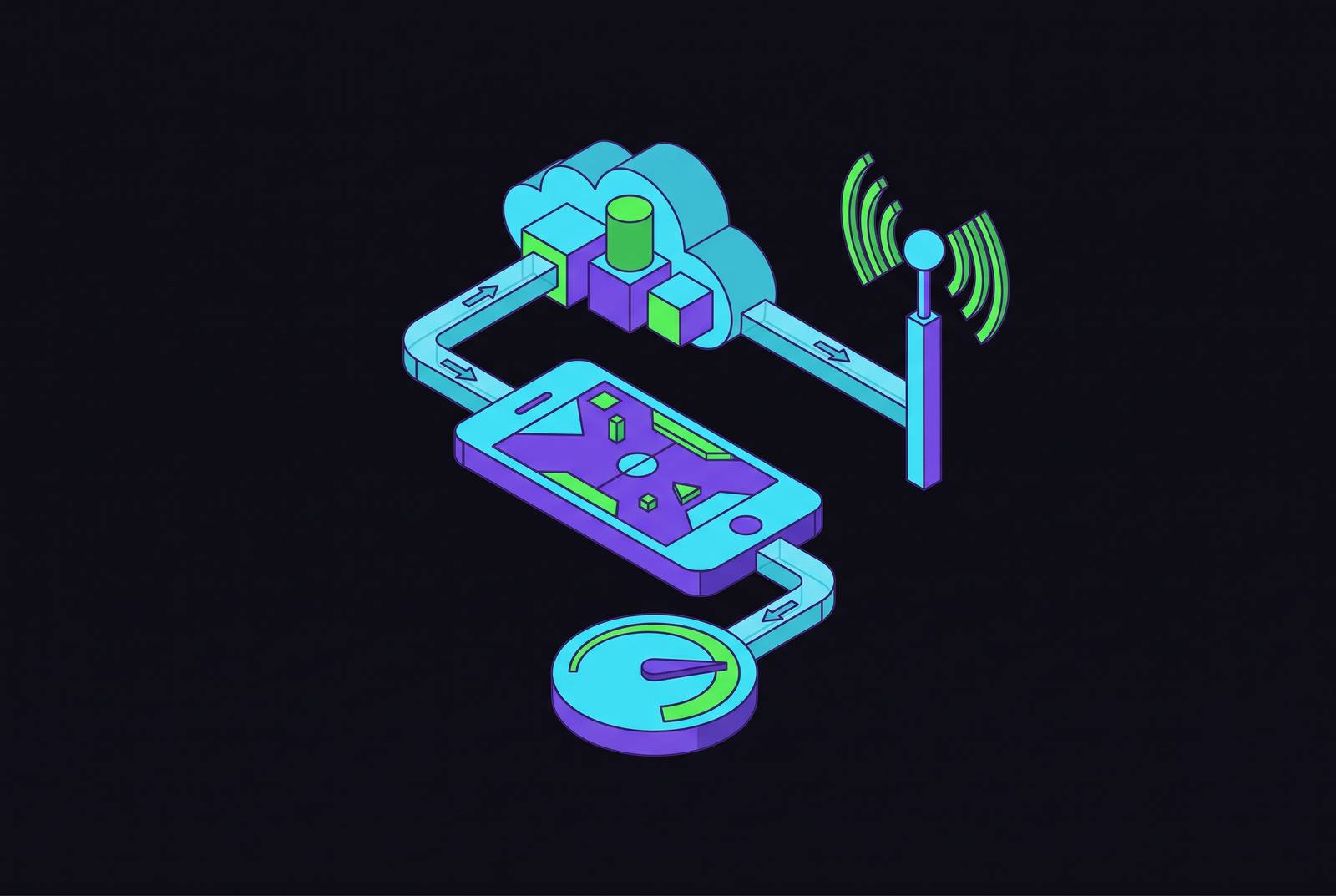
Cloud gaming streams the entire game as live video from a remote server: your phone or tablet sends nothing but button presses and stick movements, and gets back a fully rendered video feed running at up to 4K and 120 frames per second. That's the whole trick, and it's also why the data bill looks nothing like anything else on a cellular plan. A single hour can run anywhere from 4 GB to 20 GB depending on the service and the settings, and that range is the entire subject of this piece: what drives it, what it costs by the month, and how to keep it from eating a data cap alive.
Compare that to what mobile networks were built to handle. Traditional online gameplay, the kind where your phone runs the game locally and only exchanges position data and match state with a server, uses somewhere between 3 and 15 MB per hour on mobile. PC gaming online runs 40 to 150 MB per hour, and console adds a bit more overhead at 40 to 200 MB per hour. Native mobile games are lighter still: something like Candy Crush sips 1 to 5 MB per hour, and even a graphically dense open-world port like Genshin Impact tops out around 150 MB per hour. Cloud gaming isn't a bigger version of that. It's a different category of data use entirely, closer to streaming a 4K movie for the entire session than to playing a game in any conventional sense.
Three variables decide where in that 4 GB to 20 GB band a session lands, and once you know them, the number stops being a mystery and starts being something you can dial up or down on purpose. Resolution is the biggest lever: each step up (720p to 1080p to 1440p to 4K) multiplies the raw pixel data the server has to encode and send every second. Frame rate compounds that independently. Frame rate compounds resolution independently, and going the other way, from 1080p/60fps to 4K/120fps, multiplies the underlying pixel data by something like eightfold before compression even gets involved. Codec is the third lever, and it's the one that's improved the most recently: AV1 delivers the same visual quality as older H.264 encoding at roughly half the bitrate, and Boosteroid rolled out AV1 support in May 2025.
Worth separating out before going further: remote play (PS Remote Play, Steam Link, Xbox Remote Play) is not the same thing as cloud gaming, even though it looks identical on screen. Remote play streams from a console or PC you already own, sitting in your living room, not from a data center run by Microsoft or NVIDIA. That distinction changes the data math in ways this piece covers section by section, because your home upload speed becomes part of the equation in a way it never is with a true cloud service.
What each major service actually consumes, by resolution tier
Xbox Cloud Gaming runs lighter than most people expect. Testing in 2025 put lighter 2D titles at around 3 GB per hour at 720p, a fast-paced 3D shooter at 4 GB per hour at 1080p, and a visually dense RPG at peak 4K settings around 5 GB per hour. Microsoft caps the 1080p stream at roughly 20 Mbps, a noticeably lower bitrate ceiling than GeForce Now uses, which is the direct reason Xbox Cloud Gaming uses less data per session. The tradeoff shows up as more visible compression artifacts in dark or visually busy scenes, the kind of blocky shadow noise you'd notice in a horror game more than a cartoon platformer. On a 100 GB monthly allotment, that works out to around 25 hours of play. Microsoft recommends at least 10 Mbps down, and the service is accessible on both iOS and Android devices.
NVIDIA GeForce Now sits at the higher end of the range, and the reason is straightforward: it simply allows a higher bitrate ceiling. The Performance tier, running 1080p at 60 fps, lands around 10 GB per hour. Ultimate tier, pushing 1440p at 120 fps, runs 10 to 14 GB per hour. Part of what justifies that cost is flexibility: GeForce Now lets players stream games they already own from Steam, Epic Games Store, Ubisoft Connect, Battle.net, the EA app, GOG, or Xbox, rather than locking a library to one storefront. Starting January 1, 2025, new subscribers on Performance or Ultimate plans hit a 100-hour monthly playtime cap, roughly 3 hours a day. Anyone who'd already subscribed as of December 31, 2024 got grandfathered into unlimited playtime through the rest of 2025, with the cap set to apply to every paid subscriber starting January 1, 2026. NVIDIA has said fewer than 6% of existing users will actually feel that change. Go over the cap and it costs $3 for 15 extra hours on Performance, $6 on Ultimate. A Data Saving mode is built in and can cut consumption by up to half, and a manual bitrate cap is available through the service's streaming quality settings.
PS Remote Play works differently at a structural level: it streams from a PS5 sitting at home, not a data center, so total usage depends partly on that console's upload speed. Mobile sessions, optimized for a smaller screen, tend to run between 2 GB and 4.5 GB per hour, noticeably lighter than most true cloud services. It also has the lowest bandwidth floor of any major option at just 5 Mbps, which makes it the most forgiving choice on a shaky or inconsistent mobile connection. With a strong home upload connection and 5G on the phone end, latency lands around 40 to 60 milliseconds, tight enough for most single-player and slower-paced games. This is arguably the best fit for travel, hotel Wi-Fi, or anywhere bandwidth can't be counted on.
Steam Link runs on the same principle, streaming from a user's own PC rather than a remote server, but it's built with a different assumption in mind. It recommends a minimum of 15 Mbps and ideally 30 Mbps or more, numbers that assume a home network, not a cellular connection stuck in traffic. It's designed to maximize fidelity on your own Wi-Fi rather than to survive a mobile network the way PS Remote Play is.
Line all four up and the 4 GB to 20 GB spread from the intro turns out to be exactly right, just not evenly distributed. PS Remote Play at mobile settings and Xbox Cloud Gaming sit toward the bottom of that range. GeForce Now at Ultimate tier settings sits at the top. Where a given session lands depends entirely on which service, which tier, and which settings, and none of it is random.
How resolution and frame rate choices translate into monthly totals
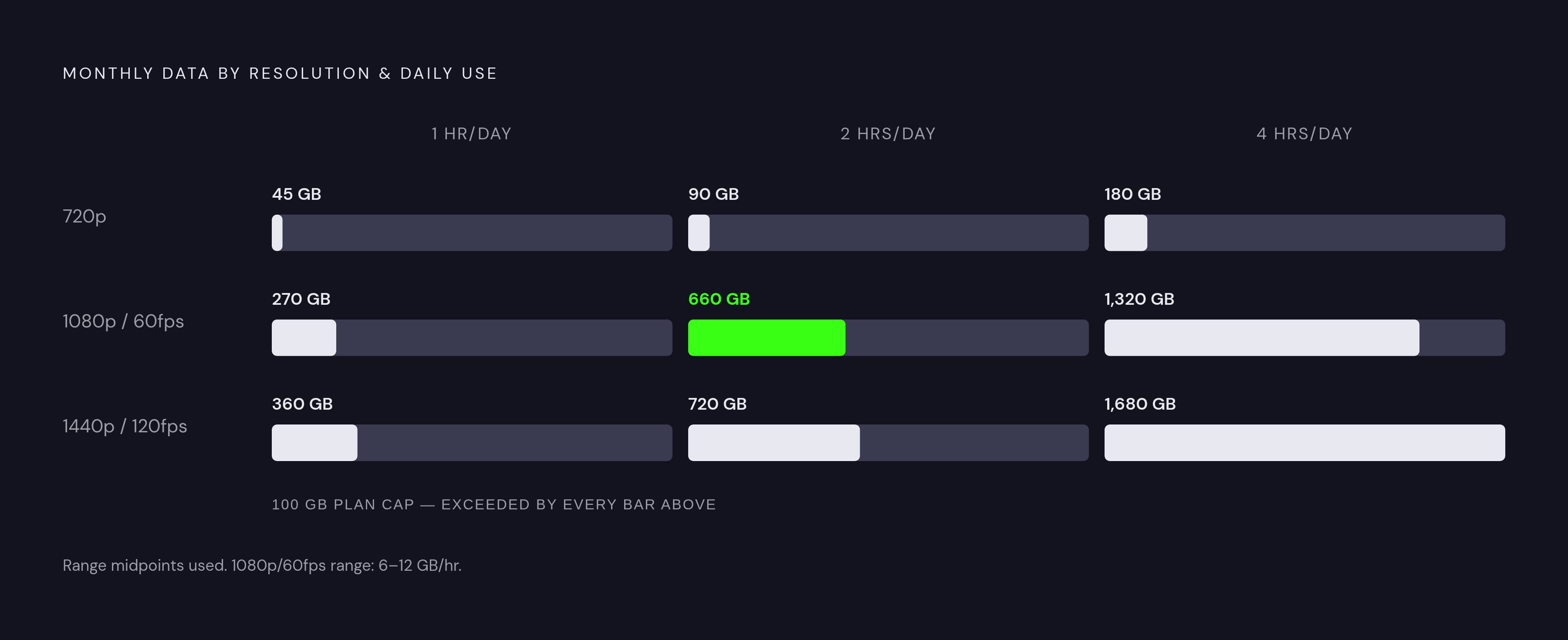
Break the numbers down by resolution and the pattern gets easier to hold in your head. At 720p, the lightest cloud services run around 1.5 GB per hour. At 1080p and 60 fps, the range across services runs 6 to 12 GB per hour. Push up to 1440p at 120 fps and it's 10 to 14 GB per hour. Those aren't small gaps between tiers, they're multiples.
Run that out to a monthly total and the picture gets uncomfortable fast. Two hours a day at 1080p adds up to somewhere between 240 GB and 660 GB a month. That's not a rounding error, that's the entire difference between a plan that comfortably handles the habit and a plan that generates an overage notice every single billing cycle. On a cellular connection specifically, a single hour at 1080p can burn through most of a standard mobile data allotment in one sitting, not because the math is exotic, but because cellular plans were never designed with 6 to 12 GB per hour in mind.
Frame rate makes the swings even sharper. Moving from 1080p at 60 fps up to 4K at 120 fps represents something like an eightfold increase in raw pixel data per second before any compression gets applied, meaning the frame rate choice alone can be as consequential as the resolution choice.
Here's a case worth making plainly: on a phone screen in the 6-inch range, 720p looks fine. That's not a downgrade you're forced to accept, it's a sensible match between image quality and the size of the display it's shown on, since a phone screen simply can't resolve the extra detail 1080p or 1440p would add at that viewing distance. And the payoff is real: dropping to 720p cuts data use by nearly half compared to 1080p, for a visual difference most people won't register at arm's length.
The practical version of all this: treat a mobile session as a 720p, 30 fps experience by default and save the higher settings for home Wi-Fi. The quality gap between 720p and 1080p is much smaller on a 6-inch screen than it is on a 55-inch TV, but the data savings stay exactly as large either way.
Building a playbook for staying under a cellular cap
Start with the moves that save the most data for the least effort, then work down to the finer adjustments.
Lower the resolution first. Cutting from 1080p to 720p inside a cloud gaming app's settings menu can cut data use by more than half in a single change, and it's usually the fastest fix available. The visual hit is smaller on a phone screen than it would be on a television, but the megabytes saved are identical no matter what screen the game ends up on.
Cap the bitrate manually where a service allows it. On GeForce Now, a manual bitrate cap is available through the streaming quality settings, and reducing it trims data noticeably with barely any visible quality loss, particularly in single-player or slower-paced games where split-second visual clarity matters less. GeForce Now's built-in Data Saving mode can do similar work automatically, cutting consumption by as much as half.
Drop the frame rate when the game doesn't need 60 fps. Falling back from 60 to 30 fps can meaningfully reduce data use on its own. Competitive multiplayer, where reaction time is everything, is where frame rate actually earns its keep. Single-player campaigns and story-driven games tend to hold up fine at 30.
Turn on AV1 wherever it's offered. It delivers equivalent image quality to older H.264 encoding at roughly half the bitrate, and it's worth checking the codec settings any time a service supports it, since Boosteroid added AV1 support back in May 2025 and more services are likely to follow.
Match the service to the moment. PS Remote Play's 5 Mbps floor and mobile-optimized data use make it the most efficient option for anyone who already owns a PS5 and needs to play away from home. Xbox Cloud Gaming's 3 to 5 GB per hour range, plus browser access with no app required on iOS or Android, makes it a low-overhead default. Save GeForce Now's higher tiers, where the bitrate and frame rate genuinely shine, for sessions on home Wi-Fi.
And actually check usage rather than guessing at it. On iOS, that's Settings, then Cellular, then scrolling down to see per-app data use for the current billing period, with the counter resetting each new cycle. On Android, it's Settings, then Network & Internet, then Data Usage, broken down by app. The per-resolution estimates above are useful for planning ahead, but actual consumption shifts with game genre, network stability, and codec, so treat the numbers as a starting point to measure against, not a promise.
One more thing worth naming here, even if it sounds like a footnote: a physical controller changes how a session actually unfolds. Touch controls tend to invite longer, more distracted sessions, tapping in and out, restarting menus, leaving the stream running in the background. A controller in hand tends to produce more focused, deliberate sessions, which matters when every minute connected is pulling data off a capped plan.
Structuring a mobile plan around how you actually play
The math above sorts players into rough categories, and it's worth figuring out which one actually describes real habits before picking a plan. Someone playing a few hours a week at 720p can probably get by on a moderate data allotment, as long as cloud gaming isn't the only thing drawing from that pool. Someone playing daily, mixing home and mobile sessions, is close to needing an unlimited plan if 1080p is the target resolution, though staying at 720p on PS Remote Play or Xbox Cloud Gaming can make the math work on a large but still capped plan. Anyone playing multiple hours a day at high settings is really only served by unlimited data: the 240 GB to 660 GB monthly range at 1080p makes that call for itself.
Network type matters here too. 5G handles cloud gaming's bitrate demands far more reliably than 4G LTE, which can work at lower settings but tends to introduce instability that causes a service to drop resolution automatically and unpredictably mid-session, which defeats the purpose of trying to plan usage around a fixed number in the first place.
Hotspot data is its own trap. Most plans cap hotspot data lower than the plan's overall allotment, so gaming through a phone acting as a hotspot for a laptop or tablet burns through that smaller pool fast, even if the main data allotment looks generous. Worth checking that specific number on a plan before assuming the headline data figure applies.
GeForce Now's 100-hour monthly playtime cap, which applies to new subscribers from January 2025 and is set to extend to all paid subscribers from January 2026, adds a second constraint that runs alongside the data cap rather than replacing it. At the higher bitrate tiers, 100 hours of play can represent an enormous volume of data in a month, a number no cellular plan comes close to offering. In practice, that means the time cap will bind long before the data cap does for most subscribers on the higher tiers, an odd twist where the limiting factor isn't gigabytes at all, it's the clock.
The planning sequence, in order: estimate hours of play per month, multiply by the per-hour rate at the target resolution, compare that total against the plan's actual data allotment, and adjust resolution or service accordingly before signing a contract, not after the first overage charge shows up. It's a small bit of arithmetic that saves a genuinely annoying phone call to a carrier later.
A controller built specifically for mobile use, one that connects directly to the phone without adding its own latency, makes the whole 720p, 30 fps strategy easier to live with day to day. Lower settings stop feeling like a compromise and start feeling like the normal way to play on the go, which is really the whole point of treating cloud gaming's data appetite as something to manage on purpose rather than something to be surprised by every month.