Best Bluetooth Game Controllers for Android Phones
Premium clip controllers and standalone pads each solve different Android gaming setups.
My phone drawer has four Bluetooth controllers in it right now, and I use maybe one and a half of them regularly. That's the real starting point for this piece: Android gaming got good enough that carrying a controller stopped being weird, but nobody warned me the shopping part would turn into its own hobby.
The vendors making Bluetooth game controllers specifically designed for Android phones include Backbone, whose Backbone One and Backbone Pro are built for Android (with separate iOS versions), and GameSir, whose G8 and related clip controllers target Android explicitly. Xbox produces the Xbox Wireless Controller, which pairs over Bluetooth with Android phones and has become a reference device for cloud gaming on the platform, though it was not designed as a mobile-only product. The broader market also includes Razer and 8BitDo, whose standalone and clip-style controllers carry explicit Android compatibility, with 8BitDo in particular offering wide multi-system support and free companion software for remapping.
Mobile gaming now pulls in something like 55% of all gaming revenue worldwide, per Newzoo, which means the phone in your pocket is the primary gaming console for most of the planet, not the thing you poke at in a waiting room. Android carries most of that weight. About 71% of mobile gamers play on Android, and the platform held a 47.2% revenue share of the mobile games market in 2024 according to Grand View Research. So when people talk about phone controllers, they're mostly talking about Android controllers, even when the box doesn't say so directly.
The accessory market has caught up. Estimates put it around $2.5 billion in 2025, growing near 15% a year through 2033, and close to 69% of controllers sold today are wireless. Bluetooth won this fight; it wasn't close. Your phone already runs Xbox Cloud Gaming, GeForce NOW, Amazon Luna, and a pile of native titles from the Play Store. The hardware stopped being the bottleneck years ago. The question now is which controller actually fits how you play, not how a spec sheet wants you to play, and I don't think there's one clean answer. There are a few good answers depending on what's in your other hand.
What makes a Bluetooth controller work well with Android specifically
Android doesn't run an MFi-style certification program the way Apple does. It just recognizes any standard HID-compliant Bluetooth gamepad at the system level, full stop. That's a mixed blessing, and I mean that literally: it means almost anything with the right protocol will pair, and it also means there's no floor under quality. A controller can pass every check Android asks for and still feel like garbage in your hands. I learned this the hard way with a cheap no-name pad that paired instantly and then mapped its A button to something that felt like pressing a wet sponge.
Pairing and support are not the same thing, and people mix them up constantly. A controller connects fine at the system level, sure, but it might still need manual remapping inside a specific game, because HID compliance covers the handshake, not what each button actually does once you're in a match. Cloud gaming sidesteps a lot of this. Xbox Cloud Gaming, GeForce NOW, and Amazon Luna treat Bluetooth controllers as proper first-class input, usually more consistently than native mobile titles manage on their own. Emulators behave well too, mostly because that software was built around standard gamepad layouts from day one.
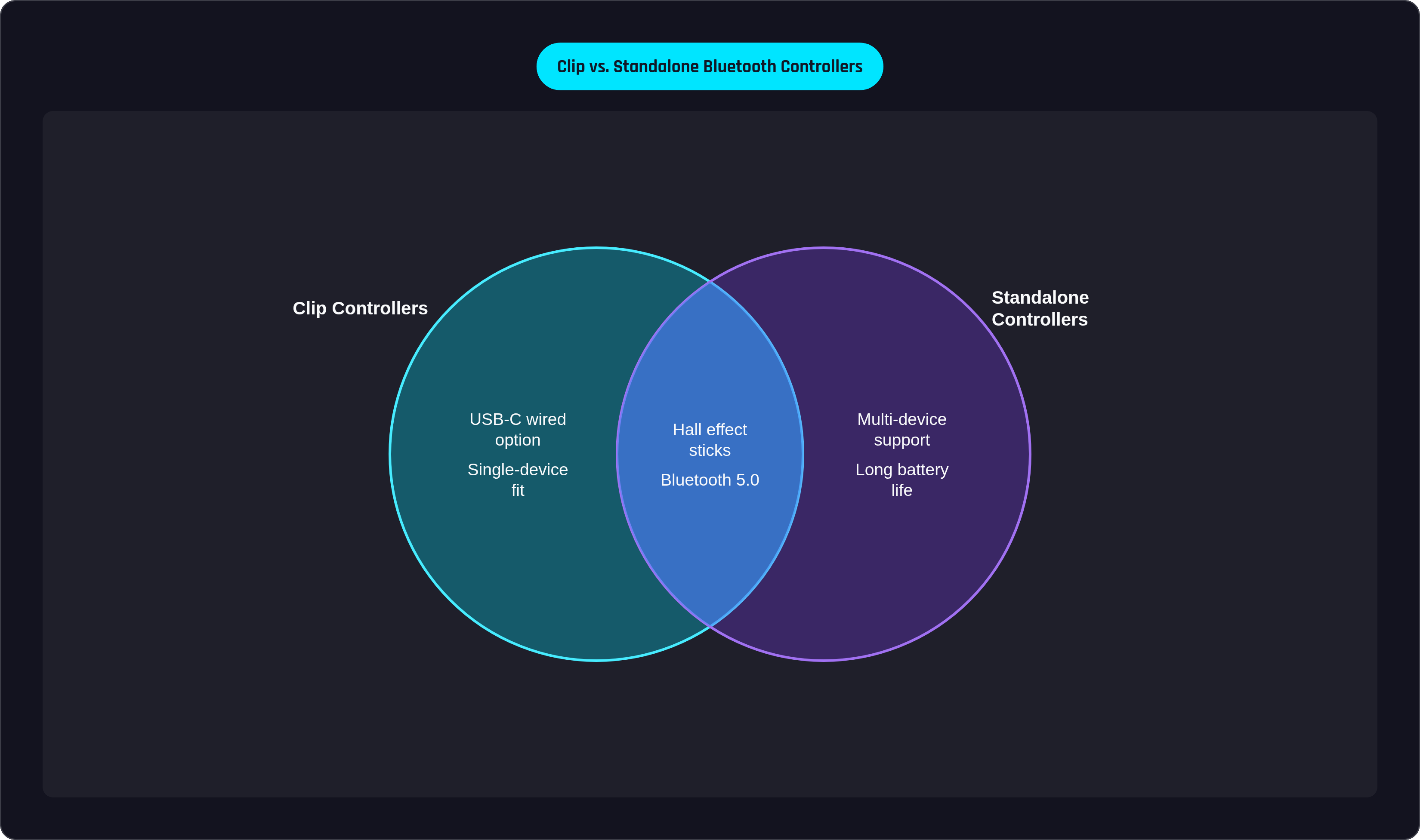
Then there's the Bluetooth versus USB-C argument, which shows up in every comment section on this topic like clockwork. Bluetooth adds somewhere around 10 to 20 milliseconds of input lag. A wired USB-C connection cuts that close to zero. On paper, wired wins outright. In practice, it's messier: a handful of Android games flatly don't recognize USB-C controllers and dump you back to touchscreen mapping, which defeats the entire reason you bought the thing. Bluetooth pairs cleanly across a wider spread of titles for exactly that reason. It also does something a rigid USB-C clip can't: it works with foldables, tablets, and any setup where two clip halves don't have a phone-shaped gap to bridge.
Connection stability, which used to be everyone's complaint, has mostly stopped being the differentiator. Over 88% of controllers released in 2023 and 2024 shipped with Bluetooth 5.0 or newer. So the argument moved to latency and stick quality, which really means it moved to stick drift.
Drift isn't a mystery anymore, and it's barely a debate. Older sticks use potentiometers, which rely on physical contact between parts. That contact wears down, and the wear shows up as your character drifting left when your thumb isn't even on the stick. Hall effect sensors fix this with magnets instead of contact, so nothing wears out. TMR (tunneling magnetoresistance) pushes the same idea further with more precision. If you're spending more than a modest amount in 2025 and the controller still doesn't have Hall effect or TMR sticks, that's a fair question to ask before you buy.
Form factor is the last fork, and it splits into two camps solving different problems. Clip controllers slot your phone between two halves and turn it into something that looks like a handheld console. Great for one standard-sized phone, awkward for basically anything else. Standalone controllers sit in your hands while the phone rests on a stand, a mount, or a TV. Foldables, tablets, and multi-device households land in that second camp, because no clip stretches to fit every screen in the house.
Which vendors make clip-style Bluetooth controllers designed for Android?
Clip controllers give you the most immersive single-device experience in this whole category. Hold one and your phone turns into the screen of a Game Boy that also happens to take calls. But fit range, weight, and how much software sits behind the hardware vary a lot, and those differences matter more after month three than they do in the store.
Backbone One is the controller that more or less kicked off this category's current shape. It connects over USB-C, built for Android, with a separate version for iOS. Backbone Pro steps up from there at $169.99, adding Bluetooth Low Energy on top of the wired connection. That one addition changes what the thing is: it's not just a clip anymore, it's a clip that can also work standalone and wireless when you're done with the phone bridge entirely.
Backbone Pro uses Hall effect thumbsticks, so drift isn't really on the table. The companion app ties into cloud services, manages your library across platforms, and streamlines jumping between apps mid-session. Some of the deeper features sit behind a $3.99 monthly Backbone+ subscription, worth knowing before you're three menus deep wondering why a button's grayed out. Xbox Cloud Gaming, GeForce NOW, and Amazon Luna are all well supported on Android, and there's a PlayStation Edition if PS Remote Play is your thing. Backbone's team has filed north of 50 patents and reportedly ran through countless part iterations on the hardware, and whatever you think of that number as a marketing line, the button feel three hours into a session is genuinely better than most of what's near this price point. That's usually where cheap controllers start showing their seams.
Other clip controllers in this range chase a similar formula: wide telescopic bridges for bigger phones, added rumble motors, six-axis gyros, lower weight from skipping a built-in battery and going pure USB-C. The tradeoffs run in predictable directions. Skip the battery, save the weight, lose the standalone Bluetooth mode. Go cheaper, and app support usually gets thinner too. The premium end of that spread is where the $169.99 price point lands, buying the standalone wireless mode, the software, and whatever the 10,000 iterations actually bought in terms of hinge feel.
One thing worth saying plainly before you spend money: if you own a foldable, or a tablet wider than roughly 210mm, no clip controller on shelves today fits it properly. That's not a knock on any one product, it's just geometry. Read the next section first.
Standalone Bluetooth controllers: the case for separating controller from screen
Standalone controllers pair over Bluetooth and don't care what's on the other end of the connection. Phone on a stand, tablet on your lap, Android TV box across the room, PC on the desk; the controller has no opinion, which is exactly the appeal if you juggle more than one screen.
The Xbox Wireless Controller has become the reference point for cloud gaming input almost by accident, more ubiquity than design intent. It pairs over Bluetooth with phones, tablets, PCs, and most TVs without extra drivers, and it's recognized natively by Xbox Cloud Gaming, GeForce NOW, and Steam. That matters more than it sounds, because button prompts in most cloud games are already labeled for an Xbox-style layout. There's no mental translation between what's on screen and what's under your thumb. It wasn't built as a mobile product specifically; it just does one thing everywhere instead of one thing exceptionally on a single device.
Emulation players and tinkerers tend to gravitate toward controllers with wide multi-system compatibility, Switch, Android, PC, even Raspberry Pi setups, paired with free companion software for remapping down to a granular level. Battery life in that tier usually lands around 15 to 18 hours per charge, which covers a weekend of sessions without much drama.
If charging anxiety is your actual problem (and for some of us, it genuinely is), a handful of controllers lean into battery life as the headline feature, some rated up to 90 hours with fast-charge windows that turn 15 minutes plugged in into another 12 hours of play. Pair that with Hall effect triggers and the controller mostly disappears from your mental list of things to manage.
There's also a foldable-controller category built for pocketability without turning into mush once you actually grip it, aimed at people who want something bag-sized that unfolds to full-size. And at the extreme end, there are pocket controllers small enough that they trade away real ergonomics entirely. Nobody buys one of these expecting console-grade comfort. You buy it because any physical button beats thumbing a virtual joystick on a cracked screen protector at gate B14.
Matching controller to use case: cloud gaming, native titles, and competitive play
No single controller wins everywhere, and pretending otherwise is how review sites end up telling a competitive Mobile Legends player and a guy running SNES emulators on the couch to buy the same "best overall" pick. The real questions: what are you playing, what's it running on, and how much software depth will you actually use after week one versus how much you'll quietly ignore?
Start with cloud gaming, since that's where Bluetooth's latency question barely registers. Streaming already carries server-side latency that dwarfs the 10 to 20 milliseconds Bluetooth tacks on, so wired versus wireless becomes close to invisible in practice. Button layout matters more. Xbox Cloud Gaming labels its prompts for Xbox-style controllers, so anything mirroring that layout, including the Xbox Wireless Controller, is the path of least friction. Some companion apps add real convenience here too, letting you jump straight into a cloud session instead of hunting through menus first.
Native Android titles from the Play Store are a different animal. HID compliance means most Bluetooth controllers pair without a fight, but game-level support swings wildly from title to title. Worth checking a game's own support page before assuming a premium controller will just work. Clip controllers tend to shine here for the immersion factor, while standalone controllers make more sense once you're on a tablet or an Android TV box.
Competitive and reaction-heavy games are where that 10 to 20 millisecond Bluetooth window stops being theoretical. It becomes the difference between landing a parry and eating one. If you're chasing every millisecond, take wired USB-C seriously. And regardless of connection type, Hall effect or TMR sticks stop being a nice-to-have here, since drift mid-match isn't an inconvenience, it's a loss on the scoreboard.
Multi-device households and foldable owners run into geometry they can't argue with: a clip sized for a standard phone will not stretch to fit a foldable unfolded, or a full tablet, no matter how much you want it to. Standalone is the honest answer. It's also where a premium dual-mode controller earns its higher price, since the combined Bluetooth and USB-C setup lets it work as a clip for the phone one day and a wireless pad for the TV or tablet the next, covering two use cases instead of forcing you to own two controllers.
Budget matters, and it's worth saying plainly: the value tier of clip controllers has closed most of the gap on fundamentals, Hall effect sticks and wide bridges included, while staying closer to half the price of the premium options. Standalone value picks fill a similar role, trading some app polish for long battery life and free remapping software. And if you're weighing a paid subscription ecosystem against a free companion app elsewhere, put that $3.99 a month into your total cost over a year or two. The hardware works fine without it. But it's the kind of small recurring charge that's easy to forget until you're squinting at a bank statement wondering what it's for.