Cloud Gaming Input Latency on Phones Across 5G and Wi-Fi
Latency matters far more than bandwidth for cloud gaming on your phone.
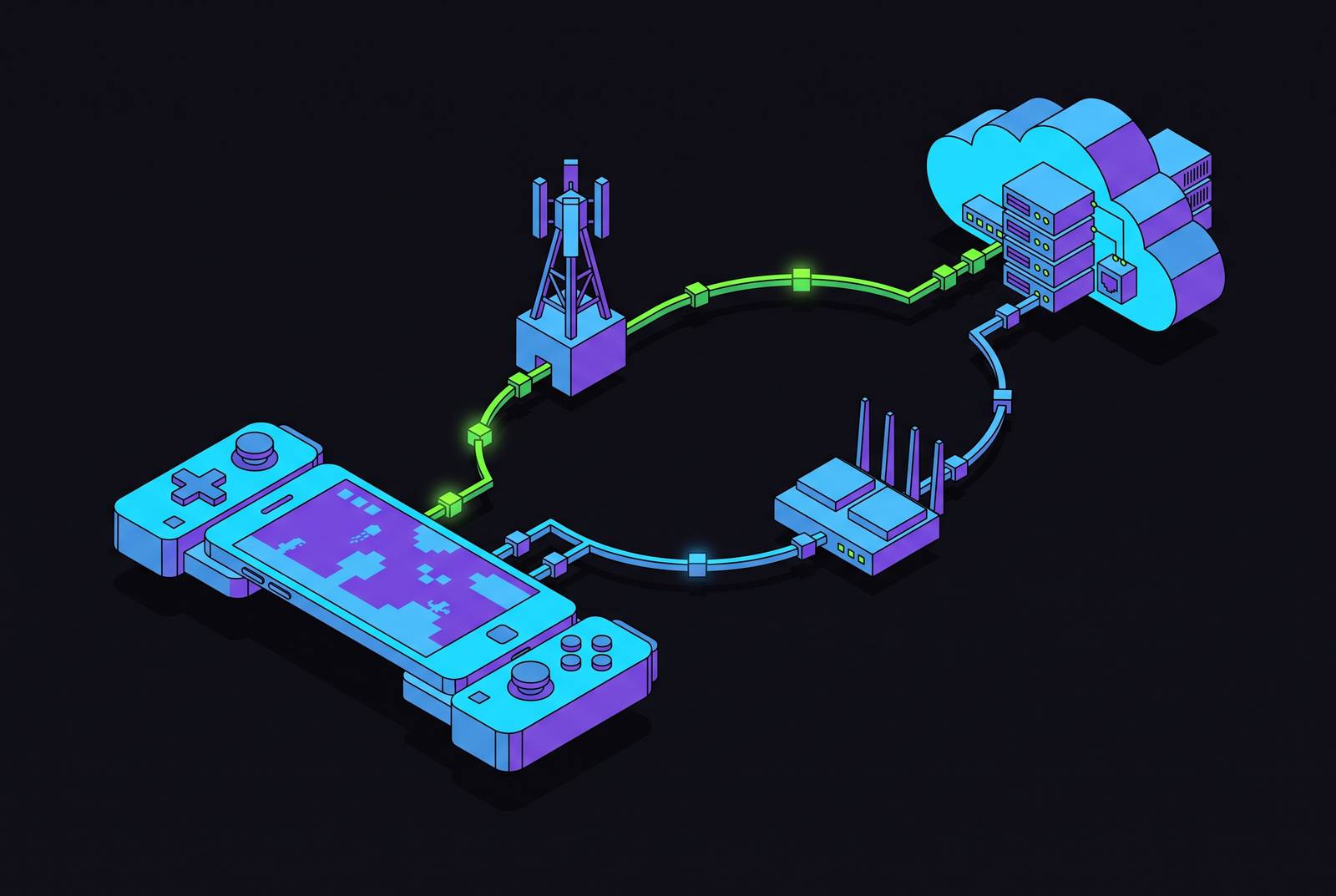
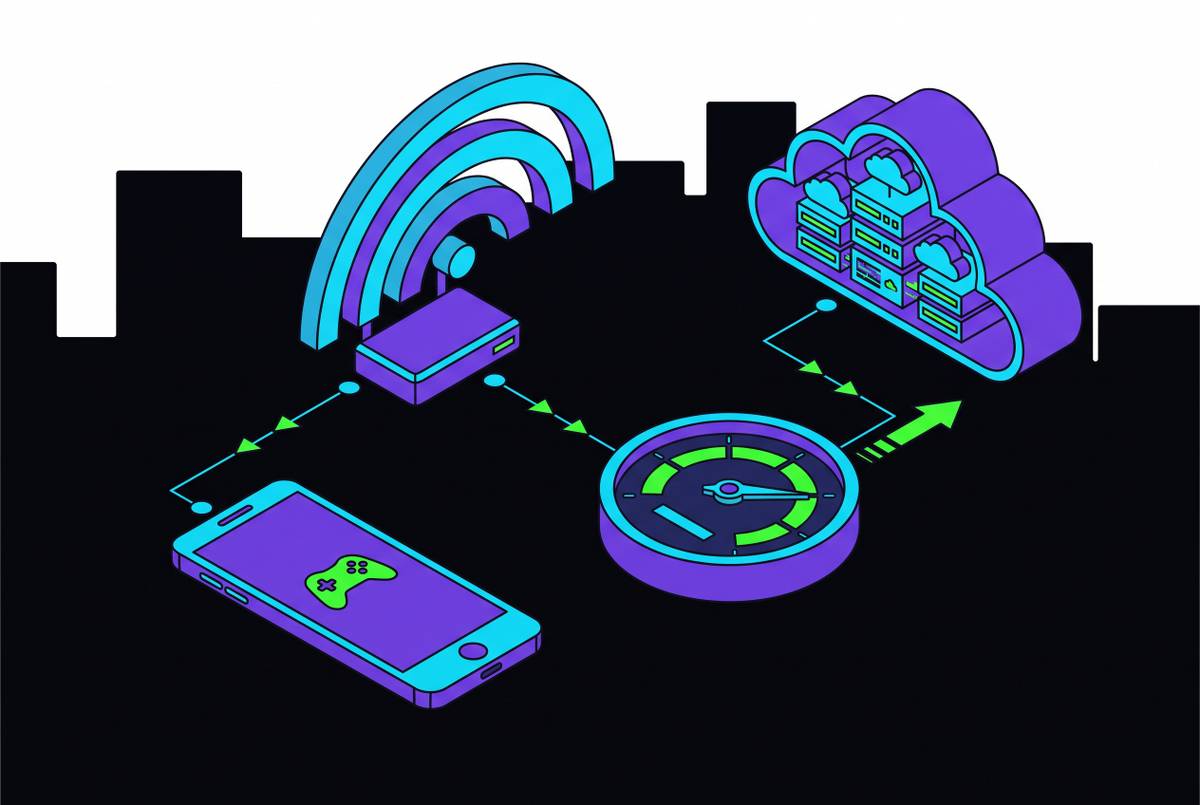
Cloud gaming input latency, the gap between pressing a button and seeing something happen on screen, runs on completely different rules than the latency that matters for streaming video. Netflix hides its delay because the video is already sitting on your phone or buffered a few seconds ahead; nothing round-trips anywhere, so pausing feels instant. Cloud gaming can't cheat that way. Every button press travels from your phone to a remote server, gets processed by a game running on hardware you'll never own, gets encoded into video, and travels back before you find out whether your shot landed, which is also why bandwidth, the number everyone fixates on, is often the wrong thing to chase.
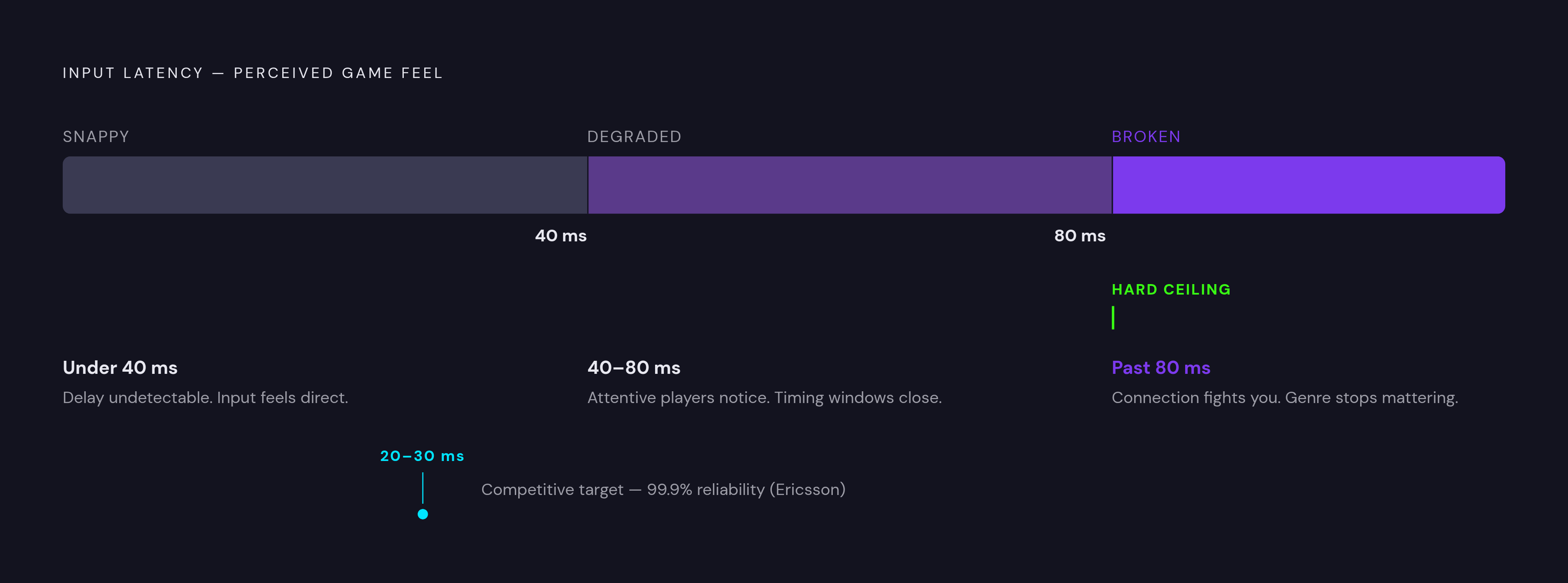
Here's a fact that trips people up constantly: a 100 Mbps connection running at 100ms of ping feels worse for cloud gaming than a 25 Mbps line running at 20ms. Bandwidth determines how clean the picture looks. Latency determines whether the game feels like you're controlling it or narrating it after the fact, a half-second behind your own thumbs. Under 40 milliseconds, most players can't consciously detect delay; input feels snappy and direct. Cross into 60ms territory and attentive players start noticing a gap between action and reaction. Past 80ms the game starts fighting you: reactions misfire, and timing windows close before your input even registers. For shooters and fast multiplayer games specifically, Ericsson's mobility research puts the real target tighter still, at 20 to 30 milliseconds end-to-end with 99.9% reliability. Not a typo. Ninety-nine point nine, which is a strange thing to type twice but there it is.
That reliability figure matters as much as the raw number, maybe more. Jitter, the variation in latency from one moment to the next, wrecks a session even when the average looks fine on paper. A connection that holds steady at 55ms plays better than one that bounces between 20ms and 90ms, because your brain adapts to a consistent delay but not to one that keeps changing its mind mid-sentence. This is also why cloud gaming favors UDP over TCP. TCP's handshake-and-retry system, where a dropped packet gets flagged and resent before the app moves on, adds delay that real-time input can't afford. UDP just keeps moving and accepts some loss, the same trade every video call and every competitive shooter makes on purpose.
What good Wi-Fi actually delivers for cloud gaming, and where it falls short
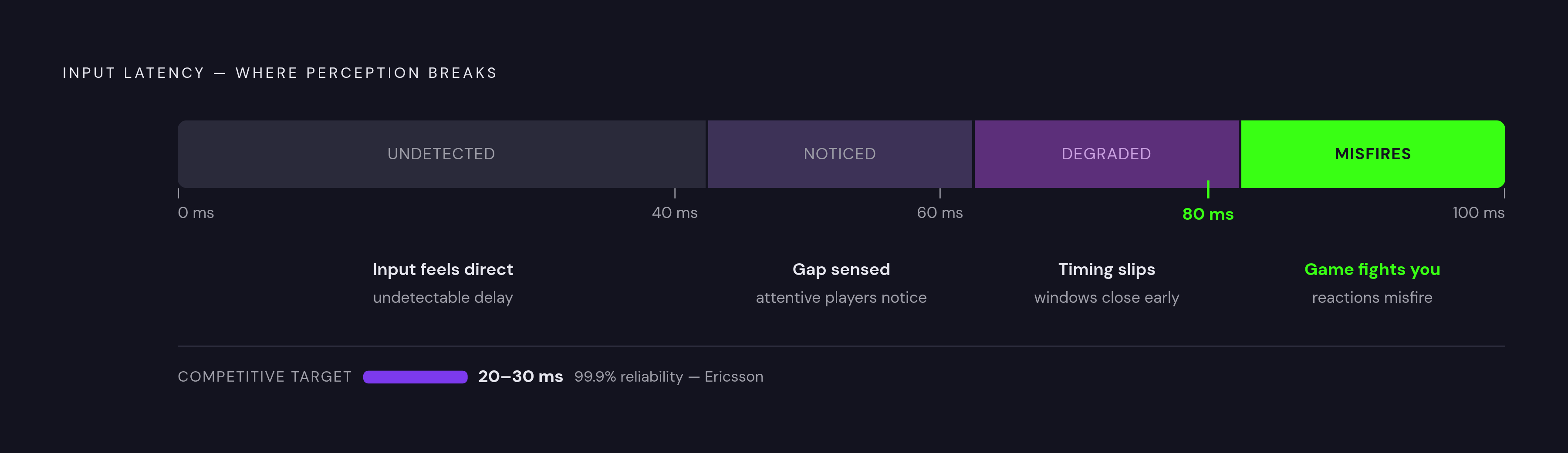
Home Wi-Fi, set up well, gets you 10 to 20 milliseconds. That's comfortably inside the 40ms target and often inside the stricter 20 to 30ms window competitive genres want. The catch: most home networks aren't set up well, and getting there takes more attention than people expect.
The band you're on matters more than most people realize. 5GHz and 6GHz deliver the low latency and throughput cloud gaming needs; 2.4GHz is a congested band shared with many other household devices. It shows up as latency spikes you can't explain and won't see coming. Routers running Wi-Fi 6E or Wi-Fi 7 cut down on that interference further. Bandwidth still has a floor to clear, though: 1080p at 60 frames per second needs at least 25 Mbps download, and 1440p at 120fps wants 35 Mbps or more on a stable Wi-Fi 5, 6, or 6E connection, or a strong 5G signal as a stand-in.
Where this falls apart is predictable. Run four devices streaming video, one kid on a video call, and a cloud gaming session at 8pm on a Tuesday, and watch your latency creep upward in ways that have nothing to do with your plan's advertised speed. Distance from the router does the same thing, quietly, and so does every wall between you and it. Wi-Fi also has a hard structural limit that no router setting fixes: walk out of range and the session just ends. Its real strength shows up when you're staying put anyway. Competitive sessions, long play sessions, situations where you control the room and the router is doing one job instead of ten, that's where Wi-Fi earns its keep.
What 5G actually delivers in the real world, not the spec sheet
5G's marketing leans on theoretical latency figures describing the physical layer under lab conditions, not what actually reaches a cloud gaming app on your phone in traffic. That number reflects what the engineering allows for, not what you'll experience waiting at a red light with your phone propped on the dash.
The real numbers, from Speedtest data in 2024, put median 5G latency somewhere between 29 and 34 milliseconds depending on the carrier. Under good conditions, industry testing lands typical 5G latency in the 20 to 30 millisecond range, clearing the 40ms bar comfortably and even threading the needle for competitive genres wanting that tighter window. So 5G isn't the also-ran the spec sheet debate suggests. It's competitive with home Wi-Fi in a lot of real conditions.
What actually moves the needle on 5G performance is distance from the tower and signal strength, full stop, more than time of day, more than which app you've opened. Network congestion during peak hours pushes latency up the same way it does on Wi-Fi, and if your signal gets weak enough that your phone quietly falls back to 4G, latency can jump to 40 to 80 milliseconds, right back into the zone where the game starts feeling disconnected from your thumbs. Mature 4G networks deliver 15 Mbps of bandwidth, enough for 720p at 60fps, but per Ericsson's research, hitting the latency cloud gaming needs on a loaded 4G network isn't realistically achievable. You need 5G for that, period. In controlled tests, 5G added only 3 to 7 milliseconds over fiber-connected Wi-Fi 7, a gap narrow enough to make the mobility trade-off look genuinely appealing, and one that keeps shrinking as infrastructure matures. That's 5G's real case: latency close enough to Wi-Fi that you get to keep moving while everyone stuck on the couch stays stuck.
When 5G wins and when Wi-Fi wins: a scenario-based decision framework
Which one should you actually use? The frame that helps isn't "which technology is better," it's "what am I doing right now and where am I doing it."
Wi-Fi wins when you're playing something twitchy, a shooter, a fighting game, a racer, where 40 milliseconds isn't a suggestion but a ceiling, and you're stationary near an uncongested router on 5GHz or 6GHz. Long sessions favor Wi-Fi too, partly because you're not going anywhere and partly because a stable home connection holds up better over an hour than most public networks do. 5G wins in the opposite situation: commuting, traveling, killing twenty minutes between meetings, or sitting at home with a router so congested that your phone's full 5G bars end up being the more reliable option. Short, casual sessions suit 5G fine too, since a few extra milliseconds barely register when nobody's trying to land a headshot.
Then there's the scenario where neither wins. One bar of 5G in a rural area, or public Wi-Fi at a coffee shop with forty other devices fighting for scraps, both tend to push latency past 80 milliseconds. At that point the genre almost stops mattering, because the connection itself is the problem, not your reflexes. Public Wi-Fi carries an extra concern too: airport and hotel networks bring congestion and security issues that make 5G the safer default even when the two are roughly tied on speed.
It helps to sort by how sensitive your game actually is to delay in the first place. Shooters, fighting games, and racing games sit at the top of the sensitivity scale, wanting that 20 to 30 millisecond target. Action-RPGs, platformers, and sports games are more forgiving, and the 40ms threshold is workable there. Turn-based games, strategy titles, and visual novels barely notice latency at all; the 80ms ceiling that wrecks a shooter is a non-event for a chess app or a text-heavy RPG that's mostly waiting on you anyway.
The infrastructure improvements that are actively narrowing the latency gap
The gap between "5G is fine" and "5G is genuinely as good as wired" is closing, and it's closing for reasons that have nothing to do with your phone and everything to do with where the servers physically sit.
Edge computing is the big one. Cloud gaming providers are moving servers physically closer to players, because latency is fundamentally a function of distance and how many hops a packet takes along the way. Edge nodes now sit within 25 miles of 80% of urban populations across North America and Western Europe, and near one of those hubs under good conditions, round-trip latency can drop under 20 milliseconds. On the network side, 5G Standalone architecture, which separates entirely from the older 4G core, unlocks network slicing and dedicated bandwidth allocation that the non-standalone flavor simply can't offer. A Princeton University study on a production 5G Standalone network measured a 178 to 249% improvement in quality of experience over standard cloud gaming apps, which is about as strong a controlled result as this space has produced.
There's also a congestion-control protocol called L4S (Low Latency, Low Loss, Scalable throughput) rolling out as part of 5G-Advanced through 2026, built specifically to flatten the latency spikes that happen on busy networks. Deutsche Telekom announced a real deployment at Gamescom 2025: a 5G+ cloud gaming offering built with NVIDIA GeForce NOW, running L4S and network slicing on Germany's largest 5G Standalone network, billed as Europe's first latency-optimized mobile cloud gaming rollout of its kind. On the home side, Wi-Fi 7 continues to lower contention and jitter, raising the floor for anyone playing from the couch. None of this fixes today's problems by tomorrow morning. But the trajectory through 2026 points toward thresholds that feel hard to hit right now becoming routine in a lot of regions.
How each major cloud gaming platform performs at the latency level on mobile
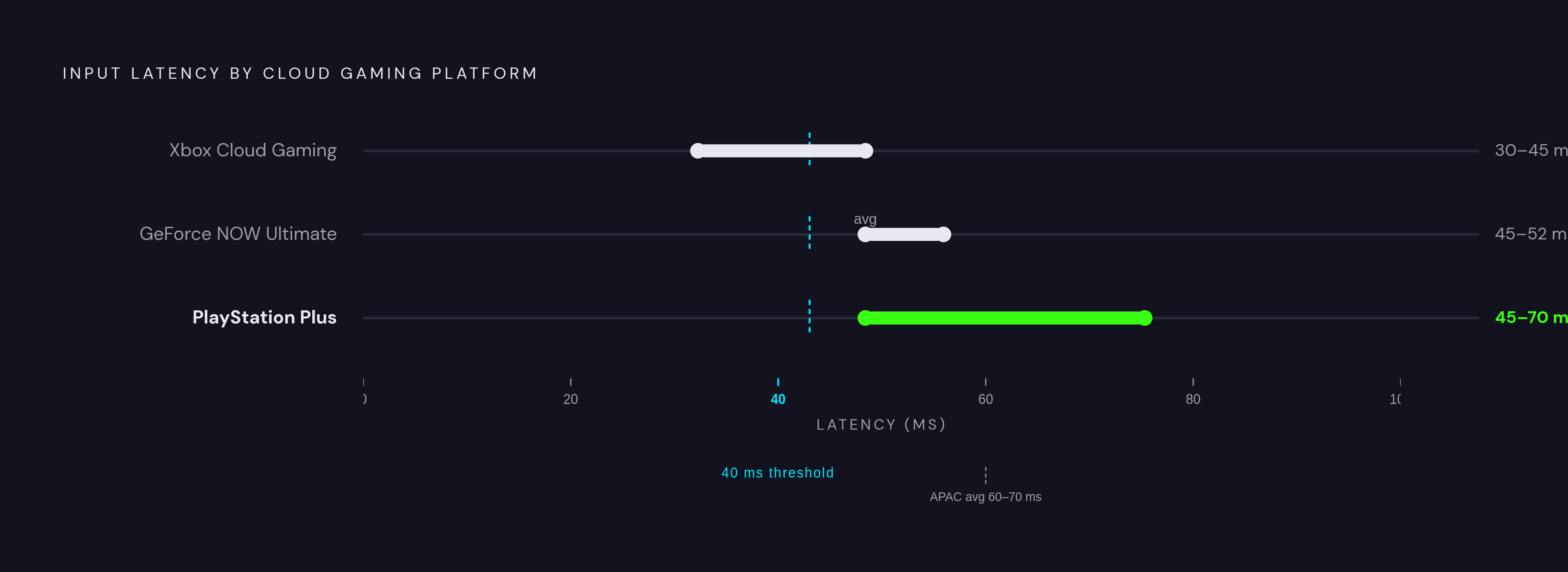
Two people on the identical network, same phone, same signal bars, can have meaningfully different sessions depending on which cloud gaming service they open. Total platform latency isn't just network latency; it's network latency plus server processing plus video encoding, and every provider makes different calls on the last two.
Xbox Cloud Gaming runs games on Xbox Series X-level hardware inside Azure data centers, so you're streaming a console you'll never physically own. A newer video encoder and doubled Azure edge node count brought felt latency down to roughly 30 to 45 milliseconds, needing about 20 to 35 Mbps for a clean 1440p stream. The catalog is the real draw: over 400 titles included with Game Pass Ultimate, including Microsoft's own games on release day, arguably the best value of any platform before latency even enters the conversation. It's a native app on Android and browser-based through Safari on iOS. For big single-player games and casual multiplayer it's a great fit; for shooters and fighters where every millisecond is a variable you're actively fighting, Remote Play from your own console is the better call, assuming you own one.
NVIDIA GeForce NOW introduced Reflex Streaming in 2025, designed to cut perceived lag by coordinating frame delivery with your input. The Ultimate tier averages 45 milliseconds of input lag, climbing to 52ms during peak hours when sessions start queuing behind other players. Location matters a lot here: players near Google Cloud and Equinix hubs in North America and Western Europe see sub-40ms performance, while Asia-Pacific users average 60 to 70 milliseconds simply because there are fewer dedicated nodes out there. Pricing runs from a free tier at 1080p with one-hour session limits, up through Performance at $9.99 a month for RTX 4080-class hardware and 1440p at 60fps, to Ultimate at $19.99. It's native on Android, browser-based on iOS through Safari, and the Deutsche Telekom partnership mentioned above means German users on eligible plans already get a preview of what carrier-and-platform cooperation looks like when it's built for latency from day one.
PlayStation splits into two genuinely different products that people lump together anyway. Remote Play streams from your own PS5 sitting at home, so the game is running on hardware you already own and already paid for. PS Plus cloud streaming, the hosted version, runs 45 to 70 milliseconds, the highest range of any major platform here, and it streams a hosted library of games. For Remote Play specifically, a strong home Wi-Fi connection or steady 5G signal matters even more than usual, since any spike gets amplified streaming from a home console instead of a carrier-adjacent edge server built for exactly this job.
Steam Link isn't a shared cloud service in the same sense as the others, so it lives or dies on your home network and wasn't built with 5G on-the-go use in mind. If you own a PC gaming library and want the mobility Steam Link can't give you, GeForce NOW is the platform built for that specific gap.
Amazon Luna is another platform in this space worth considering. It's a reasonable fit for casual and narrative games where hitting 40 milliseconds isn't make-or-break.
What the controller connecting your hands to the stream actually does to the total latency equation
Add it all up and total input latency looks like this: network round-trip, plus server processing, plus video encoding, plus whatever delay your input device introduces. That last piece is entirely under your control, and it's the one people forget about after spending an hour optimizing their Wi-Fi band.
Touch controls carry their own latency and their own imprecision, separate from anything happening on the network. Touch-sampling rates aren't instant, virtual buttons offer no analog depth for anything needing a gradient of pressure, and missed inputs under pressure happen more on glass than on a physical button, because your thumb has nothing to brace against. A physical mobile controller sidesteps touch latency entirely, trading it for either Bluetooth or wired USB-C input polling, and a well-engineered controller polls fast enough that its contribution to total latency stays small next to what the network is already adding. Going wired over USB-C removes Bluetooth's overhead completely, worth doing specifically in genres chasing that tight 20 to 30 millisecond window, where every source of delay gets squeezed out one at a time.
There's a less obvious cost too: ergonomics. Even when the latency numbers are technically fine, an hour holding your phone awkwardly against a stand causes small hand shifts and slower reactions that have nothing to do with milliseconds and everything to do with fatigue. Comfort turns out to be a performance variable, not a nice-to-have you can skip. If you've done the work to get your connection under 40 milliseconds, the controller shouldn't be the one unoptimized link left in the chain.
A practical checklist for dialing in the lowest achievable latency before starting a session
Run an actual latency test before you open the app, not a speed test; they measure different things and only one of them predicts how the game will feel. You're looking for under 40 milliseconds, ideally under 30 if you're playing something competitive. On Wi-Fi, confirm your phone is connected to 5GHz or 6GHz and not 2.4GHz, since that one setting alone can be the difference between a smooth session and an unexplainable one. On 5G, glance at your signal bars. If you're below full strength, ask whether home Wi-Fi would actually serve you better right now, before you're twenty minutes into a match and wondering why you keep dying a half-second late.
Close out other bandwidth-heavy apps on your phone, and if you're sharing a home connection, ask whoever else is on it to pause large downloads for the next hour. On the platform side, match your streaming resolution to what your connection can actually support. Forcing 1440p at 120fps onto a marginal 5G signal doesn't make the picture look better; it just adds encoder latency and raises your odds of a stutter right when it matters most.