MagSafe and Wireless Charging Compatibility with Mobile Gaming Controllers
Clamp controllers charge while playing, but MagSafe ones leave you choosing between power and grip.
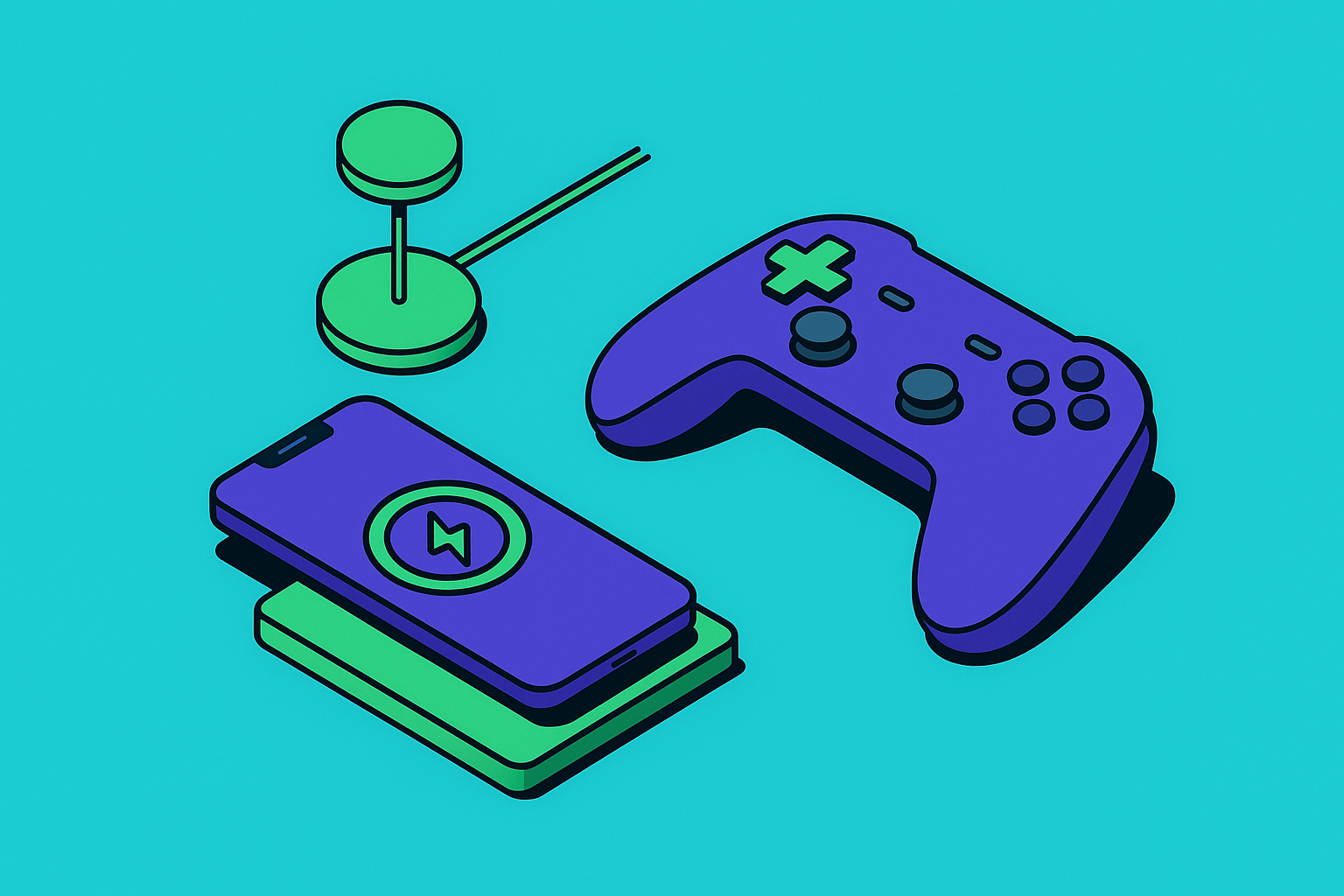
Playing a controller-based mobile game and keeping your phone charged used to be an either/or decision. That's changed, but unevenly, and the gap between MagSafe controllers, clamp-style controllers, and wireless charging pads is exactly why so many players still end up staring at a critically low battery warning mid-boss-fight.
The pattern that emerges across controllers and wireless charging attempts is consistent. Every time, the actual behavior of the thing didn't match what the box implied, and I had to backtrack to figure out why. Cloud gaming is the worst offender here: streaming at 1080p and 60fps pulls roughly 18 to 22% battery per hour, which puts an older phone at zero in about three hours flat. Add a controller, where your hands are full and the phone's port is sometimes physically blocked, and charging stops being an afterthought. It becomes a design constraint nobody notices until the screen dims and "low power mode" pops up right as they're lining up a headshot.
How clamp-style controllers handle charging, and where the port goes
Clamp-style controllers grip the phone like a vise and plug straight into the USB-C port. That means one port now does two jobs, data and power, and charging while playing gets complicated fast, since the port that used to just charge your phone now has a controller hanging off it too.
The fix is passthrough charging. A well-built clamp controller has its own USB-C input in the controller shell and routes that power straight through to the phone. The best clamp controllers work this way; plug a charger into the controller, and the phone stays topped up without anything touching its own port. It's a small piece of engineering, and it's the difference between finishing a raid and hunting for an outlet forty minutes in.
The wired connection buys you something else too: latency. Independent testing has clocked wired USB-C controllers under 10 milliseconds of input lag, since there's no wireless handshake sitting between your thumb and the game engine. So the clamp design gets you power and speed in the same package, in exchange for a cord tethering you to a controller that's supposedly there to make you feel untethered. This setup has held up for years mostly because it assumes the phone's port is always available, which is exactly the assumption MagSafe throws out.
What MagSafe actually does when a controller snaps onto it
MagSafe is the magnetic ring built into the back of iPhone 12 and later, and its job is alignment and grip. Nothing more. When a MagSafe controller snaps on, the phone's USB-C port stays completely open, because no data or power crosses that magnetic connection; everything travels over Bluetooth instead.
That distinction carries more weight than it sounds like it should. Apple's move to USB-C across the iPhone 15, 16, and 17 lines cleaned up a genuine mess: one cable and one adapter now cover nearly every recent phone, instead of splitting the world between Lightning and USB-C. Android users aren't shut out either. Several MagSafe controllers ship with an adhesive magnetic ring in the box, so a Pixel or Galaxy can fake the snap-on behavior without any Apple hardware involved.
The catch is the hold itself. Reviews of snap-on controllers describe the phone going top-heavy on bigger models, iPhone 17 Pro Max being the obvious offender, and the whole rig can separate if you flip the phone face-down at the wrong moment. Port's open, which on paper should mean wireless charging is fair game. In practice, it's messier than that, and that mess gets its own section next.
Why wireless charging through a MagSafe controller is harder than it looks
The logic seems airtight. Controller's on the back, port's wide open, so why not drop the whole phone onto a charging pad and play while it juices up? The expectation that it just works doesn't survive contact with the actual mechanism behind wireless charging.
Wireless charging, Qi or MagSafe's own flavor of it, works through two coils sitting close enough to talk to each other. Anything between the phone's back and the pad interrupts that conversation, and most snap-on controllers cover the entire back of the phone. Even a controller with a thin chassis can tank charging efficiency down to almost nothing.
There's a workaround, sort of. Some MagSafe controllers leave an open or recessed rear panel, so a MagSafe puck can attach behind or through the controller and still reach the phone's coil. That only works if the specific controller was designed with that gap in mind, though, and most weren't.
Then there's heat, which people underestimate right up until their phone feels uncomfortably warm mid-session. Wireless charging already wastes energy as heat during transfer, and gaming generates its own heat from the processor and screen running flat out. Stack both onto a phone sandwiched inside a controller shell, and you're speeding up electrolyte breakdown and capacity fade, the two quiet mechanisms that eat away at a battery's max charge over time. The warmth in your hand is the small, visible tip of a much bigger problem underneath.
For nearly every MagSafe controller on the market right now, wireless charging during active play isn't something you can count on. Even where it's technically possible, it's not something worth doing on a regular basis. The open USB-C port remains the cleanest option for anyone on a MagSafe controller who needs power mid-session.
The MagSafe controllers available now and how each handles power
MCON by OhSnap debuted at CES 2025 and became the most-watched MagSafe controller launch to date, pulling in more than $1.6 million on Kickstarter from over 15,000 backers. It snaps on via MagSafe and runs over Bluetooth, or wired USB-C if you pop it off the phone entirely. The headline feature is "kickback mode": press the eject button, pull the MagSafe module out of the controller shell, and what's left doubles as a magnetic phone stand. That gives you a way to set the phone down to charge separately while still holding the controller in your other hand. Power-wise, MCON runs its own 450mAh internal battery with USB-C charging on the controller itself; the phone still charges through its own port, not through the controller. Coverage on appleinsider.com noted it as well-balanced between portability and performance. Runs $149 now that the $99 backer tiers are gone.
The abxylute M4 goes the other direction on price: $49, the cheapest MagSafe controller on shelves right now. Snaps on via MagSafe, and throws in an adhesive magnetic ring for non-MagSafe phones. Coverage on 9to5mac.com highlighted how little friction it adds to a mobile gaming setup. It shares the same top-heavy issue as every other snap-on design, which becomes relevant the second you try balancing it on a charging pad. No passthrough here either; the port stays open for a cable, same as MCON.
Clamp-style controllers with wired USB-C and passthrough charging built in offer the cleanest power story of the group, at the cost of giving up the MagSafe snap-on form factor entirely. Some clamp controllers add Bluetooth mode on top, so players can go wired when battery life is the priority and wireless when they want to move around. The attention to detail shows in small ways, like treating passthrough charging as something a controller should just do, not a feature added on as an afterthought.
Look across all three and a pattern shows up fast: current MagSafe controllers route power through their own onboard batteries or a direct cable, never through the magnetic connection itself. The open USB-C port is still doing all the real work. The magnet just holds things in place.
Latency differences between MagSafe and wired controllers that affect how you game
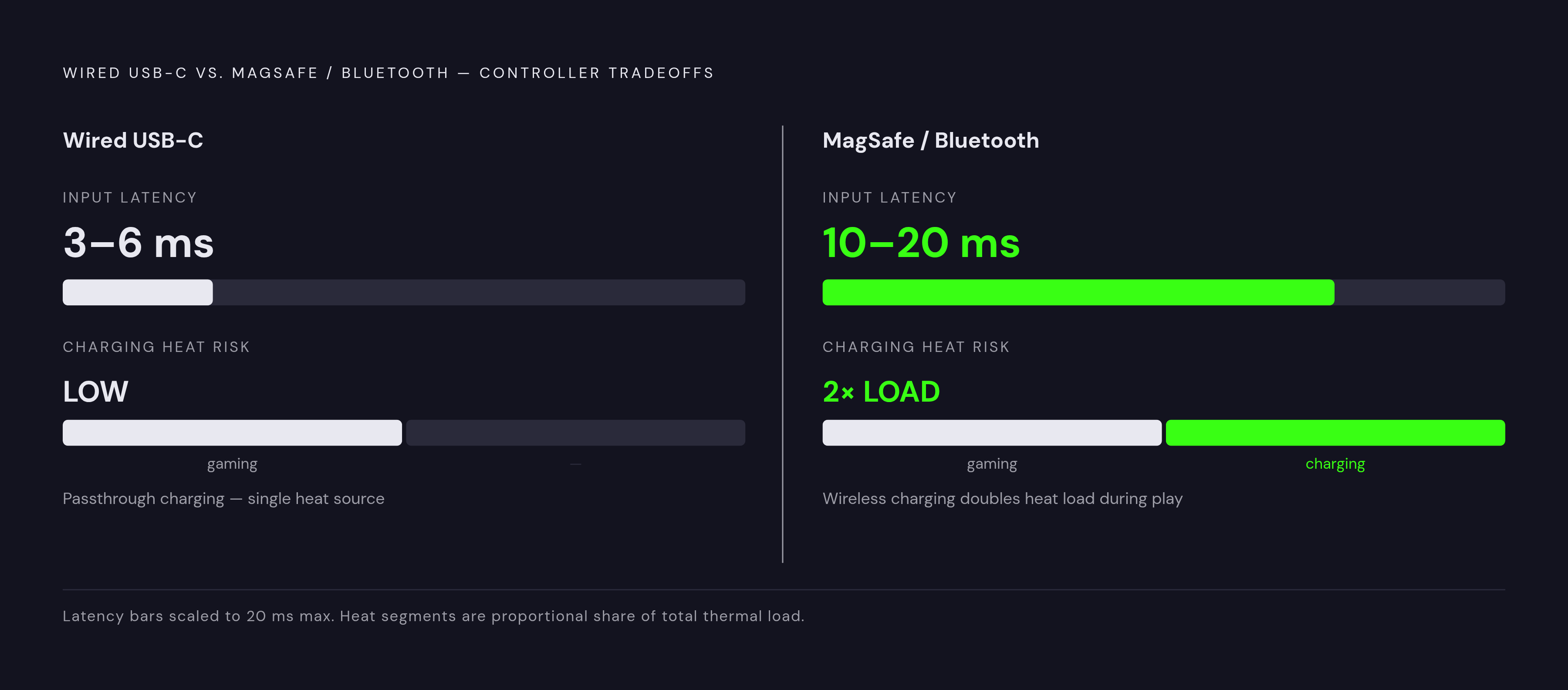
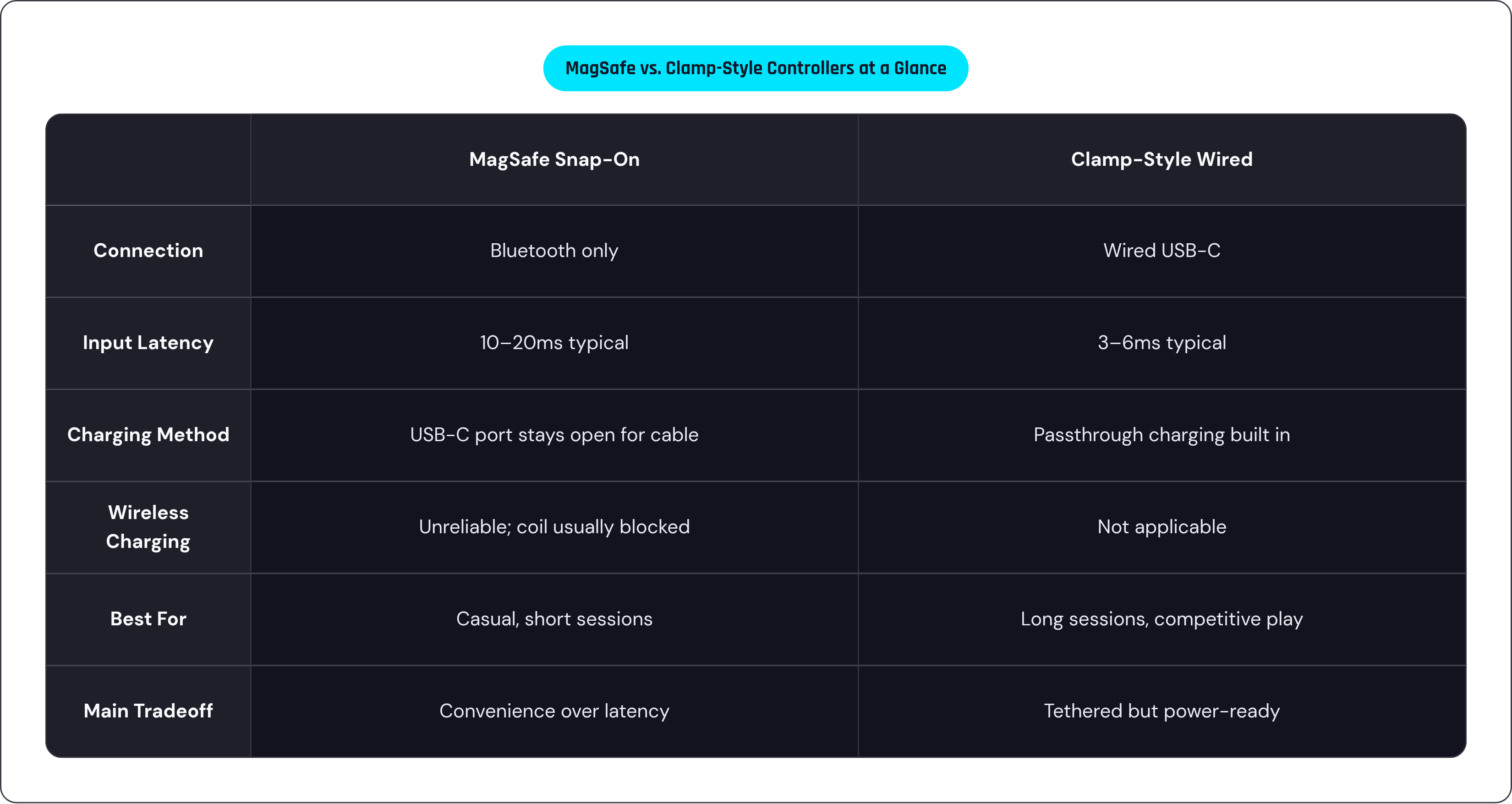
MagSafe controllers talk to your phone over Bluetooth, since the magnetic connection is purely mechanical and carries zero data. Bluetooth latency generally lands around 10 to 20 milliseconds, while wired USB-C runs 3 to 6 milliseconds by comparison, staying under that 10-millisecond mark in independent testing.
Does the gap actually matter? Depends entirely on what's on screen. For cloud gaming, RPGs, emulation, anything casual, that 10 to 15 millisecond difference is invisible; your own reaction time is slower than that gap by an order of magnitude, so there's nothing there worth chasing. Competitive shooters and other fast-twitch games are a different animal, where frame-perfect timing shows up directly on screen, and wired USB-C carries a real, measurable edge.
That flips the usual assumption people walk in with: MagSafe controllers aren't a strict upgrade over clamp-style wired ones. They're a tradeoff, comfort and convenience against a small but real latency cost. A dual-mode setup, wired for competitive play and Bluetooth for everything else, addresses exactly this choice instead of forcing you into one lane. Worth remembering for the buying decision later: match the controller to the game, not just to whatever phone happens to be in your pocket.
How to charge your phone while gaming without wrecking your battery
Wired beats wireless when you're gaming and charging at once, and it comes down to heat. Wireless charging turns some of its energy into heat no matter what; stack that on top of the heat your phone already generates from the game itself, and you've doubled up on the exact thing that wears batteries down faster. A cable through the USB-C port, direct or through a controller's passthrough, produces meaningfully less thermal stress than a pad ever will.
On a clamp controller with passthrough charging, plug the cable into the controller and keep playing. Nothing about the setup changes. On a MagSafe snap-on controller, the phone's USB-C port sits right there unblocked, so plug directly into it.
For players who really can't give up wireless charging, the better habit is charging between sessions instead of during them, or leaning on a high-capacity power bank and keeping sessions short enough to dodge the drain cliff entirely.
A few habits help no matter what setup you're running. Turning brightness down during long sessions cuts one of the biggest drains outright, and dialing back haptics and rumble helps too; they eat more battery than most people give them credit for. Gaming in direct sun or a hot car stacks ambient heat on top of what the phone's already producing internally, which compounds the problem instead of just adding to it. Charging on a bed, inside a case, or on a car seat in July traps heat exactly where you don't want it.
One hot gaming session won't meaningfully hurt your battery. But treating charge-while-gaming as the default, rather than the occasional exception, is what actually shortens a battery's lifespan over months and years, and planning around that costs nothing.
Choosing the right setup based on how and where you actually play
Three things drive this decision: what you're playing, how long you're playing it, and whether there's an outlet within reach.
Short sessions, casual games, a charger nearby most of the time? A MagSafe snap-on controller, something like MCON or the abxylute M4, makes sense. Light, attaches in seconds, and the port stays free for a cable if you need one.
Long sessions, cloud gaming, competitive titles, travel where outlets aren't guaranteed? That's where wired passthrough controllers like Backbone One or Backbone Pro earn their keep: lower latency, and a charging setup built for exactly this problem from day one.
Somewhere in between, doing both depending on the day? Backbone Pro's dual-mode design exists specifically for that: wired at a desk, wireless everywhere else.
Android users can get the MagSafe snap-on experience through an adhesive ring, though most of the MagSafe accessory world right now is still built iPhone-first, and that's worth being honest about. Wired USB-C clamp controllers offer steadier compatibility across the wider spread of Android phones out there.
A controller's design decides how it handles power long before you ever plug anything in, and that's really the thread running through all six sections above. Worth knowing before you buy, rather than mid-session, watching that number tick down toward single digits.