Mobile Gaming Phone Cooling Solutions and Their Impact on Performance
Thermal throttling cuts sustained gaming performance nearly in half compared to benchmark specs.
Thermal throttling is the real performance ceiling in mobile gaming, and most players rarely see it coming. You feel it as lag, blame your connection, and restart the app, without suspecting that your chip quietly downclocked itself to keep from turning your hand into a panini press.
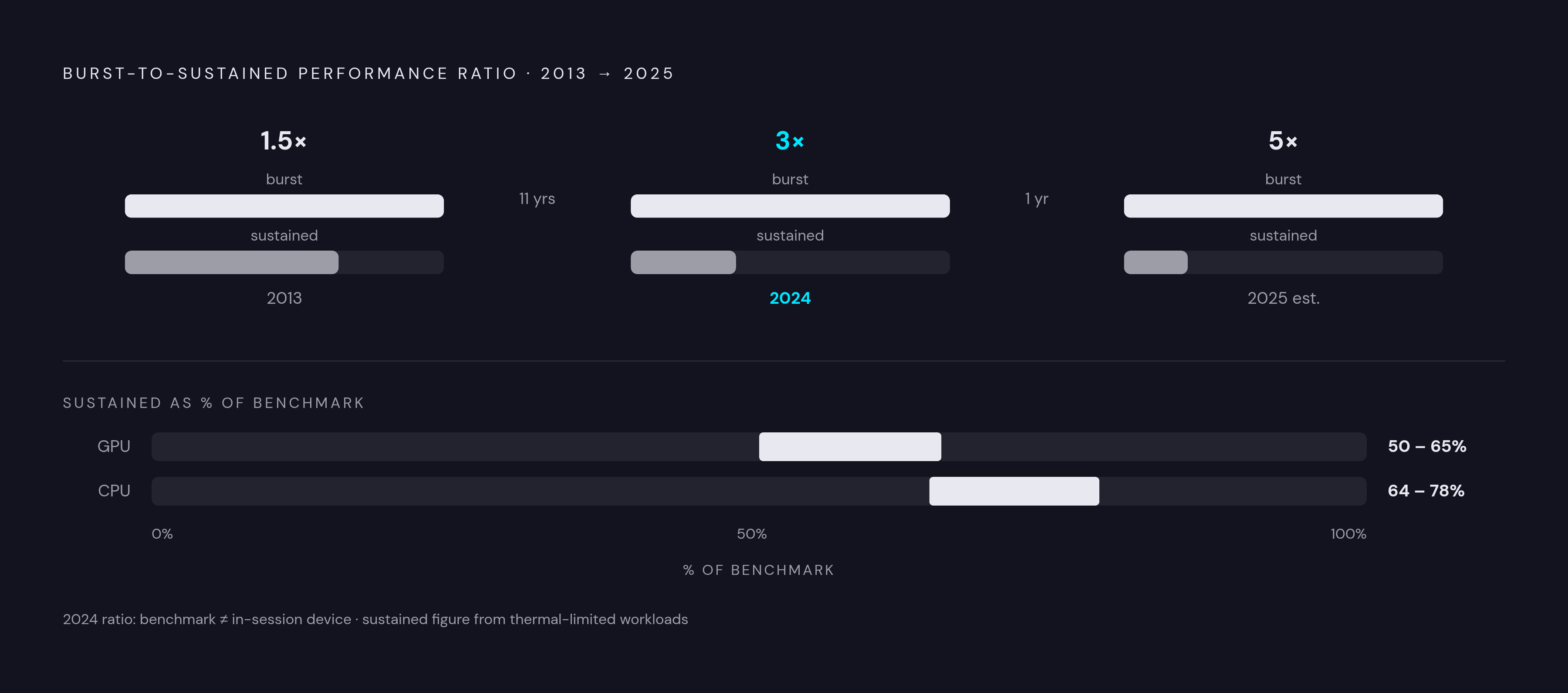
Lag during extended gaming sessions is almost never a network problem. When a phone's SoC generates 6 to 10 or more watts under gaming load and the chassis can only shed 3 to 5 watts passively, the chip quietly downclocks itself to stay within thermal limits, and that is the stutter players feel. Sustained GPU performance runs at roughly 50 to 65 percent of what a benchmark captures, and sustained CPU performance at 64 to 78 percent, because benchmarks measure brief peak output, not the throttled state the device settles into after minutes of real play. The burst-to-sustained performance ratio has widened from about 1.5:1 in 2013 to around 3:1 in 2024, meaning the gap between the spec-sheet number and actual in-session performance grows larger with each chip generation. On 5G, the modem adds its own heat on top of GPU and CPU load, and real-world testing of flagship devices showed every tested handset eventually falling back to 4G during extended sessions, with surface temperatures reaching 40 to 48 degrees Celsius.
That is not a hardware failure. It is a design compromise, and understanding it changes how you buy, accessorize, and use a gaming phone.
Why Does My Gaming Phone Lag During Long Sessions Even With a Good Internet Connection?
Gaming workloads demand somewhere between 6 and 10 or more watts from a modern SoC. A smartphone's passive dissipation limit sits around 3 to 5 watts. The gap between those two numbers is where throttling lives, and it has been widening for over a decade.
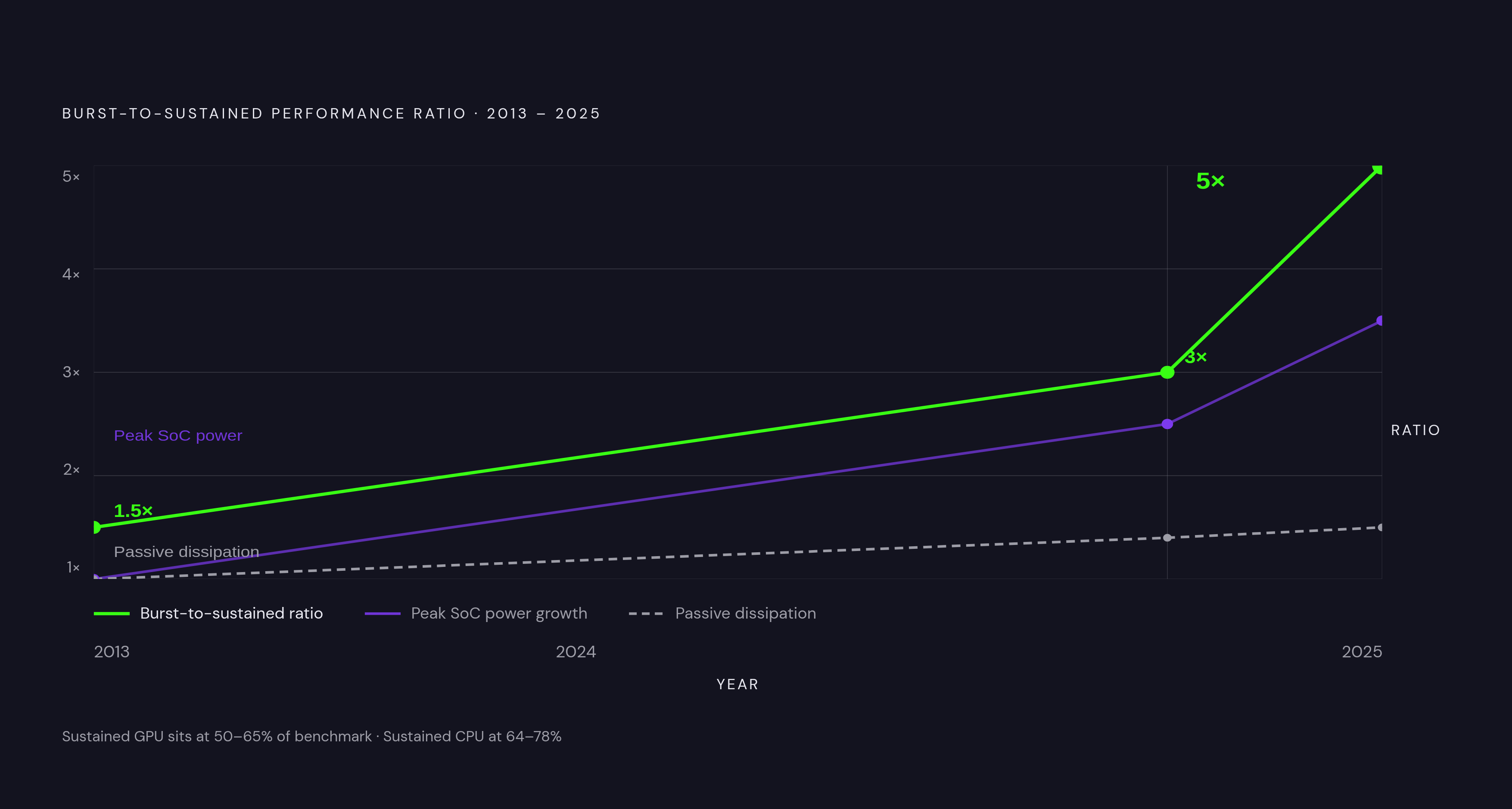
Peak SoC power increased roughly three to four times between 2013 and 2024. The chassis's ability to shed heat improved by perhaps 1.3 to 1.5 times over the same period. That asymmetry has consequences. The burst-to-sustained performance ratio, roughly 1.5:1 in 2013, sits around 3:1 in 2024, and aggressive tuning in 2025 devices can push it toward 5:1. In practical terms, sustained GPU performance runs at 50 to 65 percent of what a benchmark captures, and sustained CPU performance at 64 to 78 percent.
5G compounds the problem. The modem itself generates meaningful heat on top of GPU and CPU load. Real-world testing of flagship devices during extended 5G gaming sessions showed every tested handset eventually falling back to 4G, with peak surface temperatures ranging from 40 to 48 degrees Celsius depending on thermal design. That is not a network coverage issue; that is thermal management deciding something has to give.
The structural conclusion here is uncomfortable: phones are getting faster faster than they are getting cooler. That is precisely why cooling solutions matter more each year, and why the benchmark number on a product page is, with respect, a polite fiction about the device you will actually use.
What Throttling Actually Does to Frame Rate During a Real Session
Flagships typically hit their first throttling step within two to five minutes of sustained peak load. Budget devices, with thinner chassis and less thermal mass, can throttle in sixty to ninety seconds. The performance ceiling that follows depends on device tier: flagships sustain roughly 55 to 70 percent of peak GPU output under continuous load; mid-range devices manage 50 to 65 percent; budget phones drop to 40 to 55 percent.
Consider what that looks like in a real session. GPU frequency shifts from operating at maximum speed a third of the time to being forced to lower frequencies two-thirds of the time. Frame rates that started at 35 FPS can crater to 23 FPS. A University of Southampton study found that frequency capping increased frame-rate defects by up to 146 percent in interactive applications. That is not a marginal degradation; that is a qualitatively different experience.
Why does this go unnoticed at the point of purchase? Because benchmark tools like AnTuTu and Geekbench complete within the burst thermal window, typically one to fifteen minutes, often before significant throttling begins. Every score on a spec sheet reflects peak, not sustained, performance. You buy the benchmark device. You play the throttled one. Those are not the same device.
How Passive Internal Cooling Buys Time
Passive cooling does not remove heat. It redistributes it, spreading thermal load across a larger area to slow the rate at which any single zone crosses the throttling threshold. The distinction matters because redistribution has a ceiling: once the entire chassis is saturated, performance still falls.
Vapor chambers use liquid-vapor cycling to distribute heat uniformly across a wider surface area. Some flagship designs now reach vapor chamber areas of up to 15,000 square millimeters. Thermal interface materials, with conductivity up to 200 times better than air, move heat rapidly from the chipset toward the chassis. Strategic SoC placement, centering the processor between battery cells as in the ROG Phone 9's GameCool 9 system, keeps heat away from where hands rest, a simultaneous comfort and performance benefit.
The ROG Phone 9's graphite layer is 57 percent larger than its predecessor, improving cooling efficiency during gaming sessions by up to 12 percent. Apple's iPhone 17 Pro uses an aerospace-grade vapor chamber that holds temperatures around 3 degrees Celsius cooler than the previous generation. Three degrees sounds trivial until you realize that can be the difference between sitting below a throttling threshold and crossing it.
It is also worth considering that effective passive cooling is no longer exclusively a flagship proposition. Devices like the Blackview SHARK 6 demonstrate meaningful dissipation areas that were once reserved for top-tier hardware. The technology is democratizing, which shifts the performance conversation further down the price ladder.
But passive systems still operate within a fixed envelope. They buy time. They do not rewrite the physics.
Where Active Internal Cooling Changes the Equation
Active cooling breaks the saturation problem by physically removing thermal energy from the system rather than shuffling it around. Two approaches have matured in 2025.
The integrated turbofan approach, pioneered and refined by RedMagic, uses a miniaturized fan to expel hot air through the phone's body. Continuous removal rather than redistribution means the chassis rarely fully saturates the way a passive system eventually does. The RedMagic 11 Pro's AquaCore liquid cooling system takes this further, removing thermal energy from critical components and exhausting it through fan exhaust. In a 30-minute stress test, motherboard core temperatures stayed below 42 degrees Celsius while sustaining maximum performance. Next-generation iterations of this approach can deliver temperature drops of up to 26 degrees Celsius and sustain over 80 percent of peak performance continuously.
That figure deserves attention. The throttling penalty for a 30-minute intensive session without adequate cooling can represent a 34 percent frame-rate drop. Preventing that drop is not a marginal improvement; it is the difference between a game that degrades into choppiness midway through a ranked match and one that holds its frame budget through hour-long sessions.
The trade-off is real and worth naming honestly. Active fans are audible in a quiet room. RedMagic's design philosophy is explicitly performance-first; this is not a phone for someone who wants a discreet everyday device. For players who game in long sessions, ranked matches, story RPGs, cloud streaming, that trade-off is straightforward. For everyone else, it requires consideration.
External Cooling Accessories: What They Can and Can't Fix
Most players are not buying a dedicated gaming phone. External coolers exist to extend the thermal window of whatever device they already own, and they do so through two distinct mechanisms.
Fan coolers blow ambient air across the phone's back surface. They are simple, inexpensive, and most effective when ambient temperature is already low. Semiconductor coolers use the thermoelectric effect to actively transfer heat away from the phone, capable of cooling below ambient room temperature. They are meaningfully more effective for intensive gaming, particularly in sessions extending beyond 20 to 30 minutes.
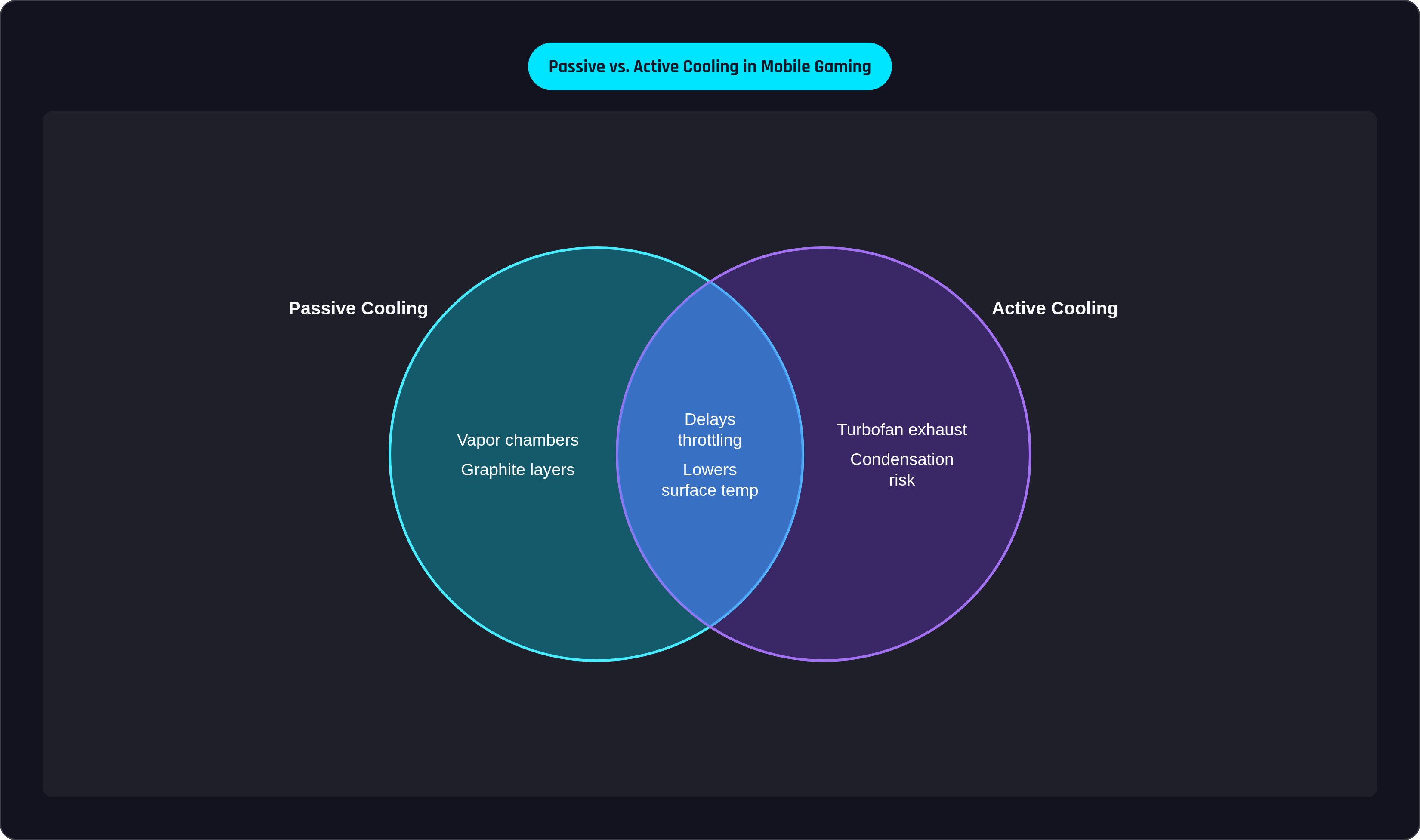
What external coolers can do: delay throttling onset, lower surface temperature, and extend the window of near-peak performance. What they cannot do: compensate for poor internal heat spreading. An external cooler applied to a budget phone with minimal thermal infrastructure has less surface area to work with. You are cooling the back of a device whose internal hot spots may not be efficiently routed to that surface. The accessory helps, but the internal design sets the ceiling on how much it can help.
One practical consideration that rarely appears in spec comparisons: controller compatibility. Players using a physical controller need a cooler that attaches to the phone's back panel without conflicting with the grip or the controller's connection point. Clip-on magnetic designs generally handle this better than full-wrap cases. It sounds like a minor point until you are trying to reposition your grip mid-session because the cooler is interfering with your trigger access.
Price context: consumer models typically range from fifteen to sixty dollars, making external cooling one of the more cost-effective performance interventions available.
Notable External Cooler Options and What Distinguishes Them
The cooler market has matured enough that the differences between options are now meaningful rather than cosmetic. A few stand out.
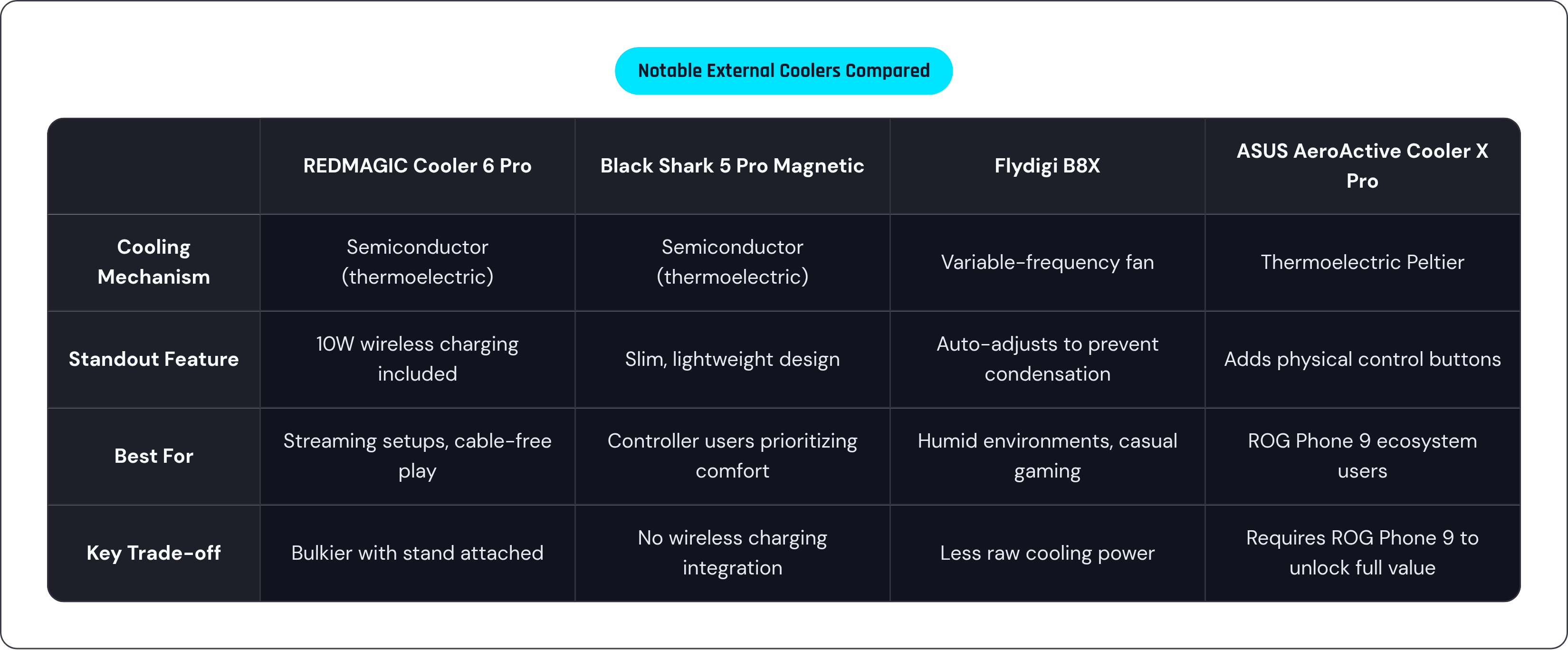
The REDMAGIC Cooler 6 Pro pairs a 30-watt semiconductor cooling chip with 10-watt wireless charging, allowing simultaneous play and charging without a cable threading through your grip. A stand included for both landscape and portrait modes makes it particularly suited for streaming setups. It is engineered for near-silent operation, which matters if active fan noise is a dealbreaker.
The Black Shark 5 Pro Magnetic Cooler uses a 35-watt semiconductor chip rated to reduce surface temperature by up to 45 degrees Celsius. A substantial fan area, a copper cooling plate, and high-conductivity silicone pads constitute the thermal stack. The body is designed to stay slim and lightweight, which is a meaningful design priority when you are already holding a phone and possibly a controller.
The Flydigi B8X includes variable-frequency temperature control that automatically adjusts power output to prevent condensation. In humid environments, that is a genuinely practical feature rather than a marketing bullet point. Magnetic attachment and cross-platform compatibility round out a well-considered design.
The ASUS AeroActive Cooler X Pro, designed specifically for the ROG Phone 9, uses thermoelectric Peltier cooling to deliver up to 29 percent better heat management compared to the phone's internal cooling alone. It also adds physical buttons, functioning as both a cooling accessory and a control extension. Within the ROG ecosystem, it represents the clearest example of modular thermal design done with real intent.
The best external cooler is not necessarily the most powerful one. Condensation risk, attachment method, noise level, and compatibility with your specific grip setup all determine whether the accessory actually improves your session or just adds something to manage.
How Gaming-Phone Internal Cooling Compares Across the Leading 2025 Devices
Every device discussed below still throttles under sustained load. The question is when, and how far performance drops when it does.
Nubia RedMagic 10 Pro / 11 Pro. Active internal turbofan combined with a vapor chamber, with the 11 Pro adding the AquaCore liquid system, constitutes the most aggressive internal thermal architecture available in a consumer handset in 2025. For intensive titles, long sessions, and competitive play, this is among the highest sustained performance options available. The trade-off is a gaming-forward aesthetic and audible fan under load. This is not a discreet everyday device, and RedMagic does not pretend it is.
ASUS ROG Phone 9 Pro. GameCool 9 is a multilayer passive system, with center-mounted SoC, boron nitride thermal conductor offering 200 times the conductivity of air, and a graphite sheet 57 percent larger than its predecessor. The optional AeroActive Cooler X Pro adds thermoelectric cooling for up to 29 percent improvement beyond the internal baseline. The modular approach is ROG's distinctive proposition: a strong internal foundation that extends meaningfully with the right accessory, without forcing that accessory on users who do not need it.
Samsung Galaxy S25 Ultra. Strong passive thermal management in a device that does not announce itself as a gaming phone. A solid option for players who want reliable sustained performance without the gaming-peripheral aesthetic. It throttles; all of them do. But it manages the decline gracefully for the vast majority of session types.
iPhone 16 / 17 Pro Max. Apple's aerospace-grade vapor chamber in the 17 Pro is passive but highly effective. The 3-degree temperature advantage over its predecessor translates to reaching throttle thresholds later. Apple's chip efficiency also means the 17 Pro tends to arrive at those thresholds later than Android counterparts running comparable workloads. For iOS-native gaming and Apple Arcade, and for players already in the Apple ecosystem, the thermal performance is genuine rather than marketed.
The shared ceiling bears repeating: none of these devices eliminates throttling. The differentiation is in the timeline and the severity of the drop.
Why the Cooling Market Is Growing, and What That Signals
The mobile phone cooler market was valued at over a billion dollars in 2024, with active cooling devices already the dominant product segment. Gaming is the largest application area driving that growth. The demand signal is coming directly from players.
That raises an important question: why now, and not five years ago? The answer is in the burst-to-sustained ratio. When the gap between peak and sustained performance was modest, cooling was a comfort feature. As that ratio has expanded toward 3:1 and beyond, cooling has become a performance feature. Players who game seriously enough to notice the difference between 60 FPS and 23 FPS are willing to pay for solutions.
Emerging directions in the market reflect this shift. AI-driven adaptive fans that modulate speed based on real-time thermal load rather than fixed thresholds represent a meaningful improvement over binary on/off cooling. Phase-change materials that absorb heat at the solid-to-liquid transition point offer passive heat absorption without moving parts. Modular cooling architectures designed around 5G device form factors are appearing across more product lines.
Asia-Pacific leads in cooling adoption, driven by a gaming culture where mobile is already the primary competitive platform and hardware investment follows seriously. That market dynamic tends to preview where Western adoption heads next.
Cooling is becoming a mainstream performance category. The billion-dollar market figure is the confirmation, not the prediction.
Practical Decisions: Matching Your Cooling Approach to How You Actually Play
The honest framing here is that most cooling advice treats every player as a competitive esports practitioner, which most players are not. Session length and game type matter more than any single specification.
If your sessions run fifteen minutes or less, throttling may barely enter your experience. The burst window is generous enough that casual play rarely hits the degraded performance floor. External cooling is a low-priority investment at this session length.
If your sessions run 30 to 60 minutes, this is where the throttling penalty becomes tangible. Passive internal cooling buys time but does not eliminate the drop. An external semiconductor cooler in the fifteen to sixty dollar range extends your near-peak window meaningfully and is likely the most cost-effective intervention available if you are not in the market for a new device.
If your sessions run beyond 60 minutes, involve ranked competitive play, or include cloud streaming titles that sustain consistent GPU demand, the internal thermal architecture of your device becomes a purchasing criterion rather than a footnote. Active internal cooling, as found in the RedMagic lineup, is among the most effective single solutions available. If you prefer a more conventional device, the ROG Phone 9 Pro's modular approach lets you add thermoelectric cooling when you need it without living with an audible fan when you do not.
Controller compatibility deserves a seat at this decision table. If a physical controller is part of your setup, verify that your cooler of choice attaches without interfering with the grip before purchasing. The specifications on a product page rarely address this directly.
One premise worth challenging before closing: the assumption that more cooling is generally better. An active fan cooler on a budget phone with limited internal heat spreading may produce less improvement than you expect, because the bottleneck is not at the surface the cooler reaches. Solving the right problem in the right part of the thermal chain is what separates a useful accessory from an expensive one.
The physics are not going to cooperate voluntarily. But they are at least predictable, and predictable problems have solutions.