Portable Chargers and Power Banks for Mobile Gaming on the Go
Find the wattage threshold that actually charges your phone during intense play.
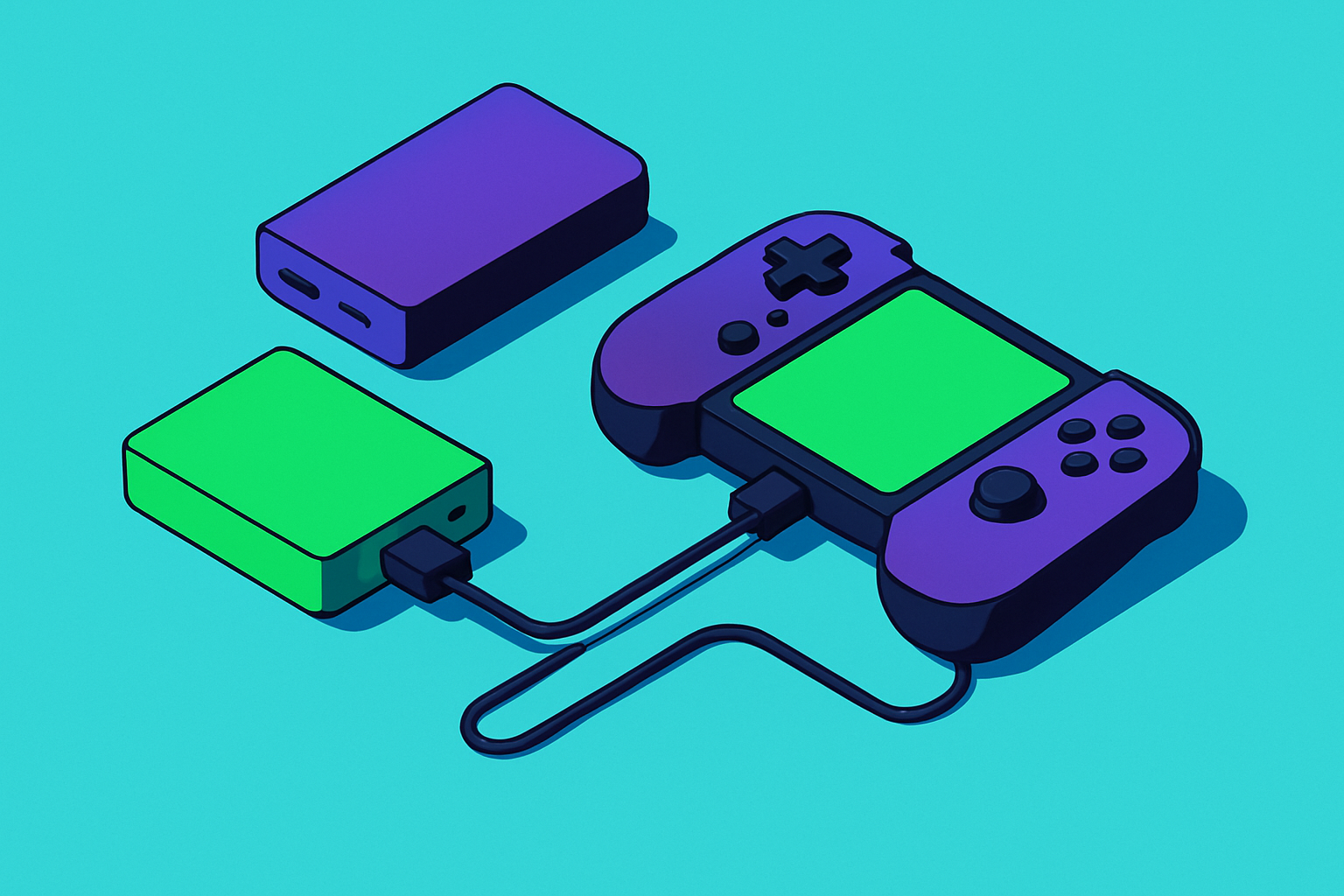
Mobile gaming asks more of a battery than almost anything else you do with a phone. The processor runs at sustained peak load instead of bursting and idling, the screen stays at full brightness for hours, and the radio stays active the whole time you're connected to a match or a cloud server. That combination is why a phone that comfortably survives a full workday of texting and scrolling can be down to 20% after ninety minutes of competitive play. This piece is about what that means for the power bank you carry, and how to actually pick one instead of grabbing whatever's cheapest at checkout.
Heat is the part people underestimate. Your phone gets warm and uncomfortable to hold, and elevated temperatures accelerate battery aging over time, not just during the session you're currently in. Gaming phones like the ASUS ROG Phone 9 Pro and the Samsung Galaxy S25 Ultra ship with vapor chambers and thermal interface materials built specifically to manage this. When device manufacturers spend engineering budget on heat dissipation instead of, say, a bigger battery, that tells you something about where the real bottleneck lives. A typical flagship gaming phone carries something in the 5,000 to 5,800 mAh range and lasts roughly three to four hours under heavy load. That's fine for a commute. A travel day, a tournament, or a long flight with spotty in-seat power is a different story. Which is the whole reason a power bank stops being a nice-to-have accessory and becomes, functionally, a session-length multiplier.
What mAh and wattage actually mean for a gaming session, and why one without the other fails
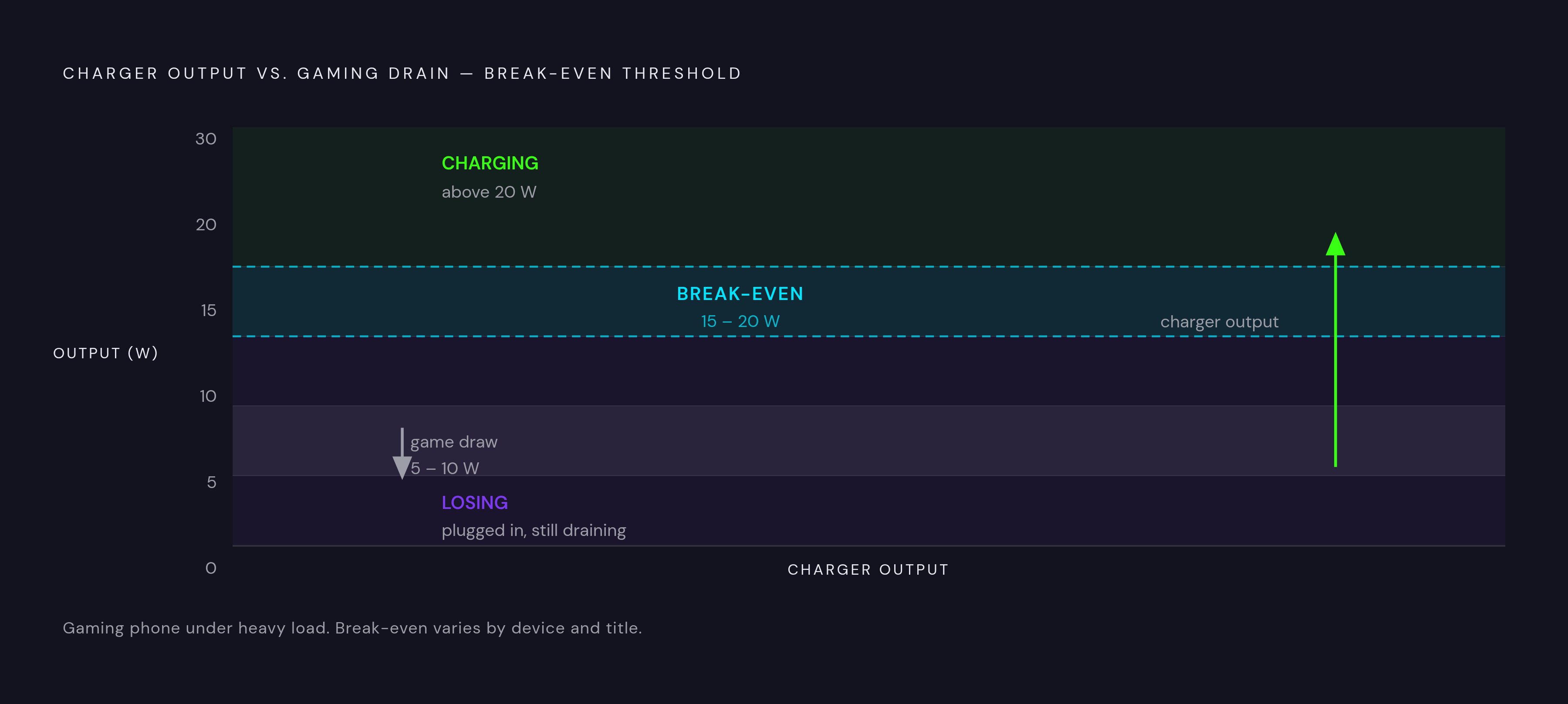
Here's the mix-up that trips up a lot of otherwise careful shoppers: mAh tells you how much energy is stored, wattage tells you how fast that energy actually moves into your phone. A power bank can have a huge capacity number printed on the box and still be useless for gaming if its output wattage is too low, because charging speed and battery drain are now racing each other, and a weak charger loses.
Gaming phones under heavy load pull somewhere around 5 to 10 watts just to keep the game running. If your power bank delivers less than 15 to 20 watts, you're just slowing down how fast the phone dies rather than actually charging it. That's the hidden failure mode nobody warns you about: you're plugged in, the little lightning bolt icon is there, and your battery percentage is still ticking downward. It's like bailing water out of a boat with a hole slightly bigger than your bucket. Technically you're doing something. The boat still sinks.
So the practical threshold is 15 to 20 watts minimum, just to break even and actually claw back charge during play rather than merely slow the bleed. Above that line, capacity becomes the next question, and it splits into two useful tiers. Around 10,000 mAh gets you roughly two full recharges of a typical gaming phone, which is the sweet spot for a single day out: commute, lunch break, commute home, maybe a match before bed. Around 20,000 mAh and up is built for multi-day trips, charging more than one device, or marathon sessions where you genuinely don't know when you'll next see a wall outlet.
One more spec worth checking before you buy: pass-through charging, meaning the bank can take power in from a wall charger and send power out to your phone at the same time without throttling either direction. This matters if you're the type who charges the bank overnight and then draws from it all day while it's also topping itself off. Not every bank handles this gracefully; some will slow to a crawl or refuse the dual duty altogether. Capacity always comes at a cost in size and weight, too. A 20,000 mAh brick is not going in your jeans pocket, and pretending otherwise leaves you carrying a permanent, awkward bulge all day.
How cloud gaming changes the power equation in ways most buyers don't anticipate
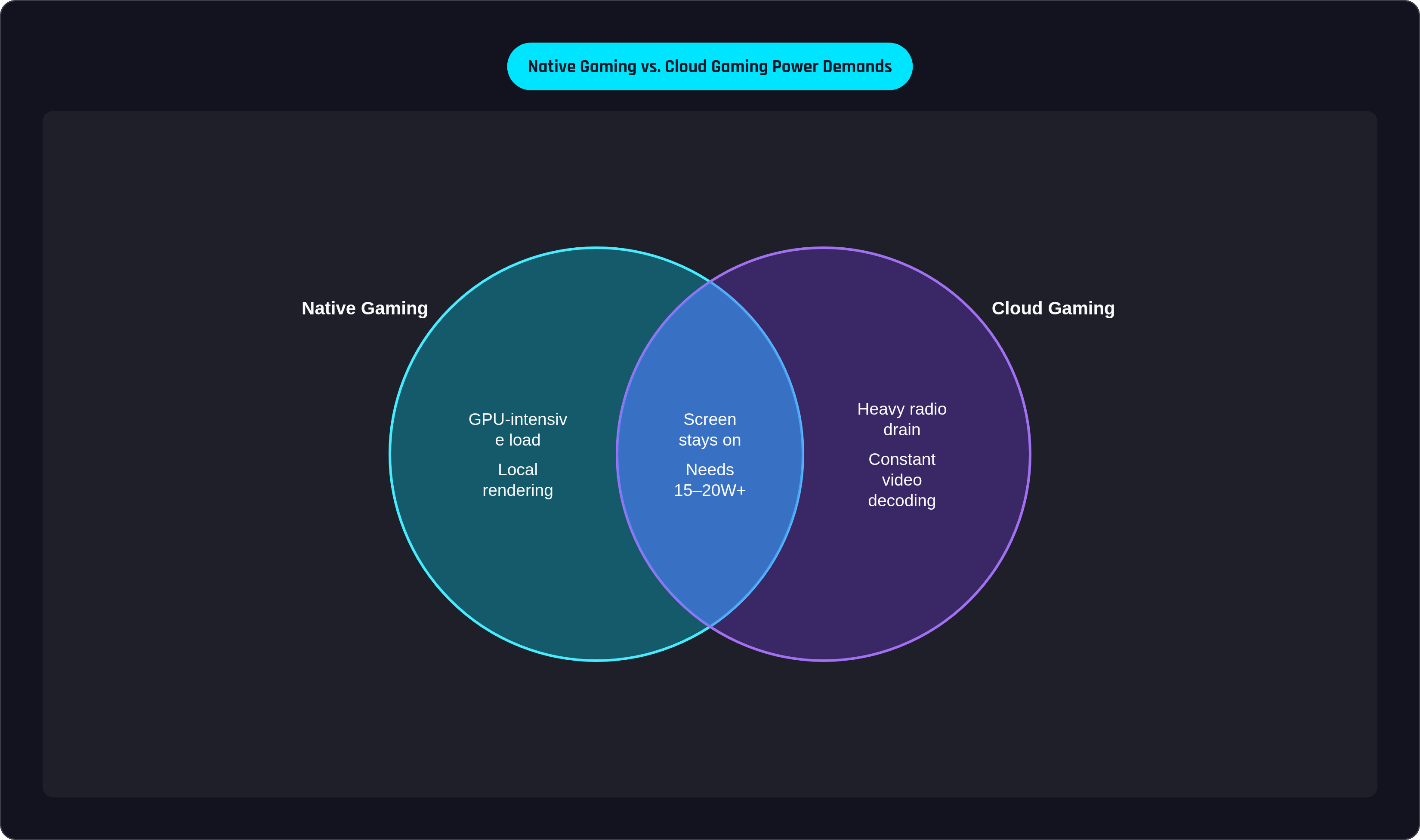
The assumption goes like this: if the cloud server is doing the heavy processing, your phone should sip power instead of gulping it. Reasonable guess. Only partially true.
On a phone, cloud gaming keeps the screen on continuously, taxes the Wi-Fi or 5G radio nonstop, and requires constant video decoding to turn the incoming stream into something you can actually see and react to. That's a different load profile than native, on-device rendering, but different doesn't automatically mean lighter. Research from IEEE has found that cloud gaming over WLAN can produce energy savings in the range of 12% to 38% on the client device compared to local rendering. That's real, but it's lab data, and real-world results shift depending on the streaming service, your network quality, and which phone generation you're holding. A weak Wi-Fi signal or a congested 5G tower can erase those savings fast, because a struggling radio burns more power trying to maintain the connection than a strong one does.
There's also a ceiling worth knowing about. A 2023 arXiv study found that in a worst-case scenario involving AI-based frame reconstruction during cloud streaming, battery life on an iPhone 12 dropped from 10.5 hours down to 6.6 hours. That's not a small margin. Different platforms, Xbox Cloud Gaming and GeForce Now among them, use different compression and streaming approaches, so the battery hit varies from one to the next. Cloud gaming isn't a guaranteed battery trap, but the drain source moves: the radio and the display do the eating instead of the GPU, and the total bill can land in roughly the same neighborhood.
Phone makers know this. Samsung's Galaxy S25 has a feature called Pause USB PD, tucked into Settings, then Advanced Features, then Game Booster Settings, that lets the phone draw power directly from a connected USB-PD charger during gameplay instead of cycling that power through the battery first. Less cycling means less heat and less long-term wear. It's a small setting with an outsized effect, and it's a good reminder that the charger's specs alone don't tell the whole story; how the phone and the charger talk to each other matters just as much.
If you want tactics that actually move the needle here, they're not exotic: drop screen brightness, favor Wi-Fi over 5G when you have the choice, close background apps that are quietly polling for updates, and turn off Bluetooth and location services when you're not using them. None of that is glamorous advice, but it's also the difference between a two-hour session and a three-hour one.
Matching the right power bank to how and where you actually play
There isn't a single correct power bank, and anyone selling you one universal answer is skipping the part where they ask how you actually play. The right choice depends on session length, how you travel, and whether you're the type who carries a bag everywhere or refuses to own one on principle.
If you're a daily commuter or casual player squeezing in matches on breaks, prioritize something slim and pocketable that charges fast enough to show visible progress in twenty minutes. A 10,000 mAh capacity is plenty here, and 20W or higher output means you'll actually see the percentage climb rather than just stall. Weight and form factor matter more than maximum capacity in this profile, because the goal is surviving lunch, not surviving off-grid.
Weekend travelers and extended-session gamers need a different calculus. Here you want enough reserve to get through a full day without an outlet in sight, possibly while also charging a laptop or a controller with its own battery. That points toward 20,000 to 30,000 mAh, with 65W or higher output if you're feeding more than just the phone. Weight becomes a secondary concern once the bank is going in a backpack instead of a pocket.
Then there's outdoor or unpredictable-conditions gaming, where rugged build quality and an IP67 water and dust resistance rating matter as much as raw specs. A bank like the Nestout 15,000 mAh is built for exactly this: situations where neither your phone nor your charger can afford to meet a puddle. Bringing the wrong gear to a festival or a campsite tends to be a lesson learned only once.
One thing that's easy to forget when budgeting your power: controllers. A wired controller draws power straight from the phone's battery, adding a small but real tax on top of everything else, while a wireless controller runs off its own battery and needs separate charging. Either way, that's another line item in your total power budget, not an afterthought.
Power banks worth considering in 2025–2026 and what distinguishes each one
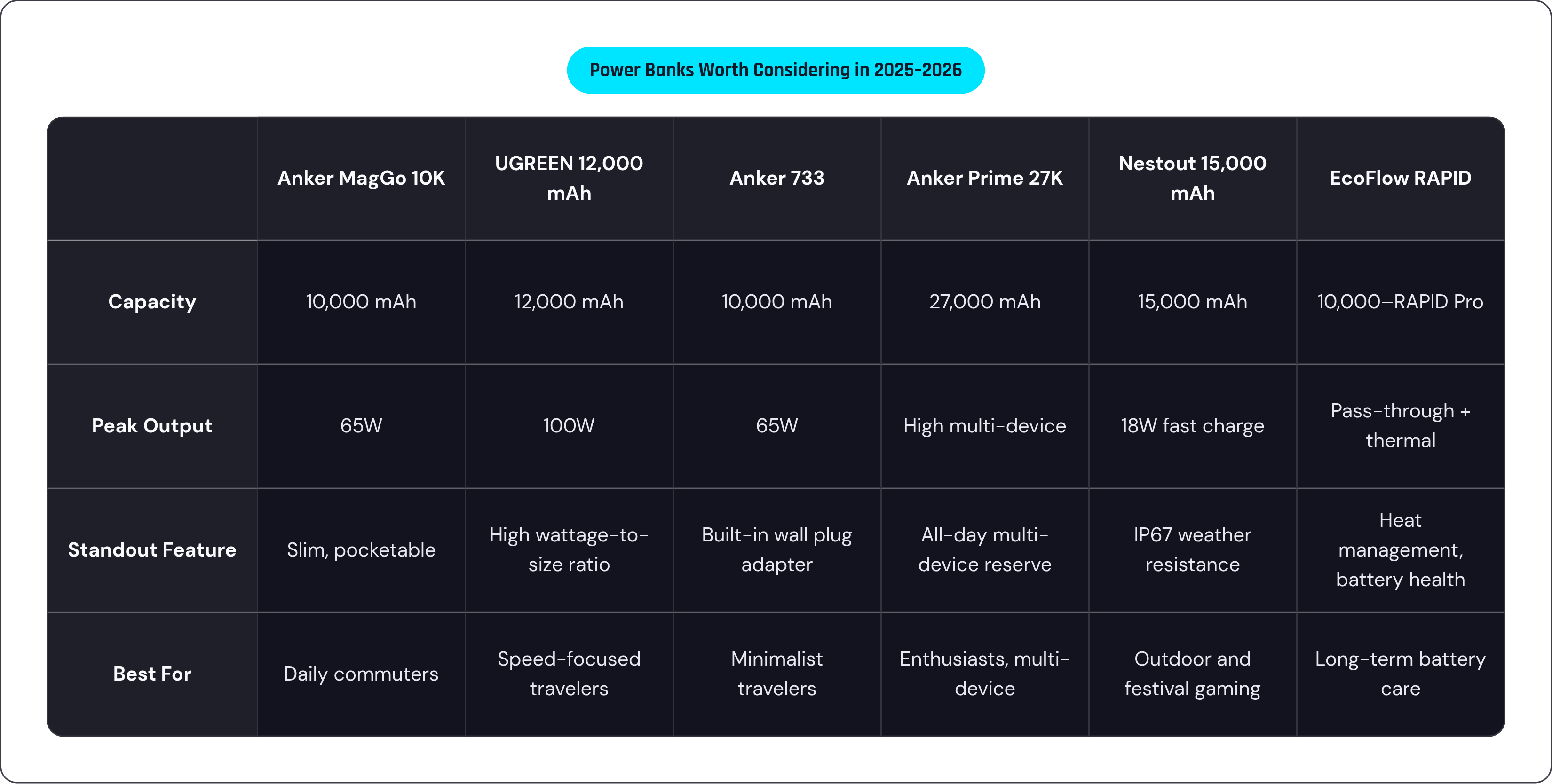
A few standouts, organized roughly by which profile above they serve.
For the commuter who wants something capable without the bulk, the Anker MagGo Power Bank in its 10K slim configuration is a strong pick. TechRadar named it a top choice for balancing portability against real output, and it delivers up to 65W through a single port, enough to charge a phone and a laptop from the same brick. It's a compact option that doesn't force you to compromise on speed just to save pocket space.
The UGREEN 12,000 mAh model with 100W output is worth a look for anyone who wants laptop-grade charging speed without carrying laptop-sized hardware; it weighs under 11 ounces and can charge a phone like the ASUS ROG Phone about twice over on a single full charge. That's an unusually high wattage-to-size ratio for this category.
The Anker 733, at 10,000 mAh and 65W, does double duty as both a portable bank and a wall plug adapter. That hybrid design means one fewer item rattling around your bag, which matters more than it sounds like if you've ever dug through a backpack at 6 a.m. looking for the right cable. It suits travelers bouncing between hotel rooms and mobile sessions who'd rather simplify their kit than optimize every last gram.
For the dedicated enthusiast, someone heading to a gaming event or on an extended trip with multiple power-hungry devices, the Anker Prime 27K is the higher-commitment option. It's heavier and pricier, and the case for it really only holds up if you're also charging a laptop or need genuine all-day reserves across several devices at once. If that's not you, it's overkill; if it is you, nothing smaller will keep up.
The Nestout 15,000 mAh, with its IP67 rating and 18W fast charging, isn't the thinnest or the highest-wattage bank on this list, and it doesn't try to be. It's built for hiking, festivals, and outdoor play where weather resistance outranks raw speed.
And for anyone who cares less about topping up fast and more about long-term battery health, EcoFlow's RAPID line, including the RAPID Pro X and the RAPID Magnetic 10,000 mAh, leans into heat management and intelligent charging cycles, with pass-through support and thermal monitoring built in. It's a different priority than the others on this list, and a legitimate one if you're trying to protect your phone's battery across years, not just across one trip.
Across all of these, check for LED charge-level indicators, real pass-through support, a built-in cable if cord management annoys you as much as it annoys everyone else, and compatibility with your phone's native fast-charge protocol. Specs on a box only tell you so much; compatibility is where the disappointments usually hide.
Getting the most out of a power bank during an actual gaming session
Buying the right bank is half the job. The other half is not sabotaging it mid-session.
A hot phone charges slower and wears out faster, even when it's plugged into a perfectly capable power bank. Heat doesn't care how many watts your charger claims to deliver; it throttles the effective charge rate regardless. So the single highest-leverage move you can make is dropping screen brightness. It costs you almost nothing in visible gameplay quality and it meaningfully cuts draw, stretching both your phone's battery and whatever's left in the bank.
Favor Wi-Fi over 5G during cloud gaming sessions specifically; the radio draws less power maintaining a Wi-Fi connection than it does hunting for and holding a strong cellular signal, and this recommendation shows up consistently across both gaming phone manufacturers and cloud platform guidance. If you're on a Galaxy S25, turn on Pause USB PD charging when gaming, tucked into Game Booster Settings, so power routes directly through the charger instead of cycling through the battery. Less cycling, less heat, and a real difference in how the battery holds up over months, not just over one flight.
Start every session with both the phone and the bank fully charged. That sounds obvious, almost insultingly so, but treating the bank as a top-up tool rather than a primary power source running from empty is what actually gets you through a long day. It's the same logic as not starting a road trip on a quarter tank because you figure you'll find a gas station eventually.
Cable quality is the detail everyone skips and everyone regrets skipping. A cheap or underpowered USB-C cable can throttle a bank's output regardless of what the box promises, so match the cable to the bank's rated peak wattage rather than grabbing whatever cord is loose in your bag. If you're running a wired controller, remember it is drawing from the phone's port too, a small load but a real one, worth factoring in when you're deciding how aggressively to dim the screen or kill background apps.
The goal here isn't squeezing out maximum charge speed. It's keeping the phone in a stable temperature and charge band for the whole session: consistent, cool, unremarkable. Boring, in the best possible way.