Phone Cooling Accessories for Mobile Gaming During Long Sessions
Thermal throttling kills frame rates mid-game—here's how cooling accessories restore them.

Long mobile gaming sessions often falter because the phone gets too hot. Phone cooling accessories ease that thermal bottleneck so the phone can keep its clock speeds where its games need them. The right choice depends on how heat builds in your setup, whether software compromises are acceptable, and how much cooling you can practically power and mount.
Why your phone slows down mid-game — and why it's not your connection
A game runs smoothly at 60fps, then suddenly drops to 30. A player loses a round or a boss fight and blames the connection. Yet thermal throttling is the most common cause of these mid-session frame drops, stutters, and sluggish controls. The phone is slowing itself down to cool off. A better connection cannot reverse that decision.
The mechanism is straightforward. Demanding games keep the CPU and GPU under sustained maximum load, generating heat faster than the phone can dissipate it. The thermal manager responds by cutting clock speeds, with a steep and immediate performance loss. Android's thermal manager can also reduce FPS or dim the display before any warning appears. The absence of a heat alert is therefore not evidence that temperature is under control.
The game is only one heat source. A bright display and warm surroundings add to the load, while playing during charging layers two heat-generating activities on top of each other. Even familiar hardware can suddenly struggle after a game patch raises shader complexity and puts more pressure on the GPU. Nothing about the phone has changed, but the work asked of it has.
What heat actually does to a long session — the consequences beyond the obvious slowdown
A frame-rate drop is not necessarily a brief interruption. Once throttling starts, the phone has to cool before its clock speeds can rise again, so it can stay slow for minutes. Sustained high temperatures also accelerate battery degradation over time. That is a separate cost from losing a round. Hot sessions over and over can leave the player paying for hardware over months, long after the slowdown ends.
Even though the game runs elsewhere, a high-resolution stream keeps the phone's decode pipeline working near its limit for the whole long session. Unlike local rendering, which can be throttled, that stream demands continuous decoding regardless of device temperature. Remote processing does not mean a cool phone. Extended streaming can make the device uncomfortable to hold while exposing its battery to damaging heat.
Xbox Cloud Gaming's hour cap, announced on September 3, 2026, makes this problem directly economic. Starting November 2026, each Game Pass tier gets a set number of cloud gaming hours per month. Time spent with throttle-degraded performance still consumes that allowance. Cooling therefore concerns more than comfort or appearance when a poor session uses metered time that the player cannot recover.
How the three main types of cooling accessories actually work
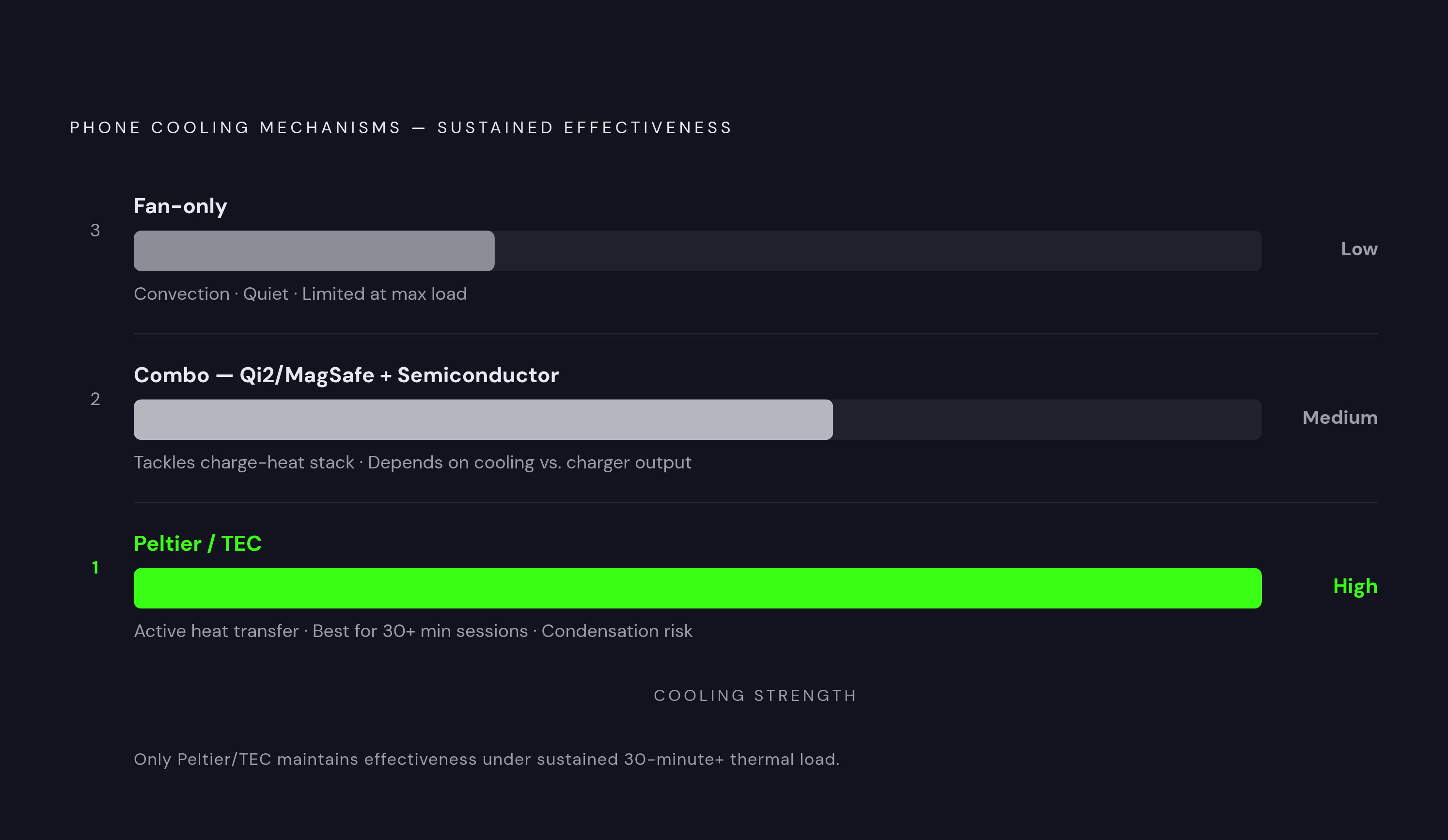
Semiconductor coolers, also called Peltier or TEC coolers, actively transfer heat away from the phone's back using a thermoelectric element. Heat moves from the phone side to an exterior heat sink. This is the most effective approach for sustained loads lasting more than 30 minutes. Meaningful surface-temperature reductions can help stabilize frame rates in demanding games such as Genshin Impact, PUBG Mobile, and Honkai: Star Rail.
That cooling strength comes with a physical constraint. In humid conditions, a Peltier unit running at maximum power can lower the phone's surface below the dew point, allowing condensation to form. Moisture near USB-C ports and speaker openings can damage the hardware. Colder is not automatically better. The useful target is enough heat removal to prevent throttling.
Fan-only coolers instead move air across the phone to speed up convection. These units are quieter and cheaper, making them useful for lighter games and moderate warmth. Their limit appears when sustained maximum load produces heat faster than airflow alone can remove it.
Combo charging-and-cooling units have both wireless charging, typically MagSafe or Qi2-compatible, and semiconductor cooling. They tackle the stacked heat of gaming while charging in one accessory. Wireless charging itself still generates heat, however. Success depends on whether the cooling component can outpace that additional output.
Mounting affects all three categories in everyday use. Magnetic mounts snap onto a phone that supports them or an added magnetic ring plate, with no clip taking up space where the player grips the phone. Spring-loaded clips fit more kinds of phones, but heat transfer depends on how firmly they press and how well they line up. A thick case weakens contact with the chassis regardless of rated power.
The free alternative: what software settings can and cannot do before you buy anything
Why buy hardware if changing a setting works? Lowering FPS from 120 to 60 or 90 and stepping graphics from Ultra to High reduces GPU pressure before throttling starts. In some cases, those changes prevent it entirely. For casual sessions at moderate settings, that may be sufficient.
The distinction is what each approach preserves. Software makes thermal headroom by lowering the visual quality or smoothness the player chose, while a cooler takes heat away to help keep those settings. Neither approach makes external heat sources disappear. Direct sunlight, a hot room, or a warm charging pad continues adding heat even after graphics settings fall.
The device still needs to cool before performance recovers, whereas active cooling can shorten or prevent that recovery window. For players happy with moderate settings, hardware may be unnecessary. For players who want to keep high refresh rates, the highest graphics settings, or full-resolution cloud streaming, a cooler takes heat away while letting the game do just as much.
Seven cooling accessories worth considering in 2026, and what each one is actually for
For players who want to see how cooling holds up over a long session, the Black Shark Magnetic Phone Cooler 6 Pro has 35W cooling power and a 0.71-inch full-color HD smart display that shows cooling stats and fan speed. App control and 16 addressable RGB LEDs add customization. It supports iPhone MagSafe, Android, and iPad, with a magnetic ring plate included for non-magnetic devices. Its appeal is information as well as cooling. A 40W+ charger is recommended for optimal performance, and the added plate can interfere with wireless charging alignment.
The Black Shark Magnetic Phone Cooler 5 Pro suits a different priority, namely flexible magnetic-plus-clip mounting and RGB customization. It offers 35W cooling, 18 addressable RGB LEDs, a fan featuring 480 diamond-inspired facets, and a detachable grip. Dual NTC sensors provide auto-shutoff, with app control and support for iPhone MagSafe and Android. There is no smart display to watch here. It is bulkier than simpler units and needs a 40W+ charger, making its mounting flexibility a more useful distinction than its decorative complexity.
For a less bulky magnetic option, the Black Shark FunCooler 6 offers 20W ICECOLD 2.0 cooling and a 12N magnetic grip. Its app controls fan speed, lighting, and auto shutoff. It works with iPhone MagSafe-compatible devices and is for players who want strong cooling in a smaller, cheaper unit than the Pro tier. The simpler package places less emphasis on premium display features.
The WHYNOTRY 50W Magnetic Phone Cooler with RGB instead fits stationary play at a desk or on a couch, where cooling power takes priority over portability. It also supports devices beyond phones. Power access is the deciding constraint here. It cannot run on a power bank and is louder than ultra-quiet models, so its suitability depends as much on the setting as on the thermal load.
A rechargeable magnetic wireless phone cooler with a built-in battery fits play where a cable would get in the way. Rechargeable units such as the 3,000 mAh options make outdoor and LAN sessions possible without a continuous wired supply. Independence comes with a finite cooling window. Their duration and output are limited compared with wired high-wattage units, making them a portability choice rather than a replacement for maximum-power desk cooling.
The NEEWER Basics Magnetic Phone Cooler is for players on a budget who want active Peltier cooling without a smart display or a set of apps. NEEWER specifies a seven-blade hydraulic fan with High Speed mode for intense sessions and Intelligent mode for quieter adaptive cooling. The unit is USB powered, includes RGB lighting, and supports magnetic-ring and clip mounting. It works with iPhone 17 Pro Max, 16, 15, and recent Samsung and iPad models.
The Torras PolarCircle Qi2 addresses gaming while charging with Qi2 wireless charging and active cooling in a small plastic and metal body made specifically for iPhone. It suits players who want one accessory for both jobs. Android users may need a compatible magnetic case or ring for full Qi2 alignment, so the convenience depends on fit as well as charging support.
How a controller changes the thermal equation for mobile gaming sessions
A physical controller changes the conditions in which a cooler works. Touch controls keep warm hands against the phone's front, while a separate controller keeps them away so they no longer add heat through contact. It also lets the phone be held differently or positioned flat. A rear-mounted cooler can then maintain contact without competing as directly with the player's grip.
Across Xbox Cloud Gaming, NVIDIA GeForce NOW Ultimate, and Steam Link sessions, a controller is effectively necessary for most genres. The phone becomes a screen and decode engine, retaining the sustained thermal load that active cooling addresses.
Steam Link illustrates why a stationary arrangement can be useful. It streams a full Steam library from the player's own PC over local Wi-Fi, free, making home sessions practical with a wired cooler. The controller and cooler perform separate jobs in that setup. One changes how the player interacts with the game, while the other manages the phone's heat.
How to choose the right cooler for your phone, your games, and how you play
Start with where you play, then what you play, then the device you need to cool. A desk or couch setup can support a wired 35W–50W unit, while outdoor or LAN play may favor a battery-powered cooler with more limited duration and output. Next, match the cooling mechanism to the session. For casual gaming at moderate settings, a fan or budget Peltier unit may be enough, but gaming at maximum performance or cloud streaming for long periods calls for a 20W–35W+ Peltier unit. Fan-only cooling is insufficient for a 60-minute high-resolution cloud session.
MagSafe iPhones and Android phones that already have magnetic ring plates can take magnetic snap-on coolers, while phones that lack the right magnetic support need a clip or plate adapter. Good contact is essential to heat transfer. For serious cooling, a thin case or caseless setup works better than a thick case, which insulates the phone from the accessory intended to cool it.
If you play while charging, a combo unit does both jobs so you do not need a separate cooler and charging accessory. Humidity then sets another boundary on power. Avoid running a Peltier cooler at maximum output for extended periods in high humidity, because condensation can turn thermal relief into a hardware risk. Smart auto-shutoff and intelligent modes can mitigate that risk. Their usefulness deserves consideration before maximum wattage wins the purchase.
Future phones may change this accessory calculation. RedMagic describes the RedMagic 11 Pro's AquaCore Cooling System as combining the industry's first mass-produced flowing liquid cooling with liquid metal 3.0, a vapor chamber, and a Turbo Fan. Built-in cooling is becoming part of the device proposition itself. Until that changes the thermal limits of the phone already in your hands, an accessory remains a practical way to remove heat while keeping the settings you wanted.